# DexGuru Getting Started

DexGuru is a non-custodial trading terminal made for traders in the DeFi era, leveraging on-chain analytics combined with token swap execution capabilities. [Meta-aggregation](/features/meta-aggregation) is used to find the best price and route for your swap orders.&#x20;

We've built an interface that provides access to easy-to-understand on-chain data analysis across decentralized protocols on Ethereum, BSC, Polygon, Avalanche, Fantom, Arbitrum, Optimism, Gnosis, and CELO to enable traders to make the best possible trade decisions in real-time!

<figure><img src="https://3551900137-files.gitbook.io/~/files/v0/b/gitbook-x-prod.appspot.com/o/spaces%2F-MO2nrmwh_DoxKc1v80n%2Fuploads%2F10kwDO4o4h4P39grS55w%2FDexGuru%20Getting%20Started4.png?alt=media&amp;token=f38c0718-3062-41d1-a49f-1b22065633dc" alt=""><figcaption></figcaption></figure>

## Getting Help & Finding Answers

When using DexGuru, you may find yourself coming across some questions, and we hope to be able to answer them all in this documentation. We suggest looking for the relevant section on the left or using the search bar to answer your questions; you will most likely find your answer the fastest that way.&#x20;

Below is an overview of some key sections in the help documentation:&#x20;

[Connect your Wallet](/how-to/connect-wallet) - Quick Guides on how to connect your wallet and engage with core functionality such as swaps and price alerts&#x20;

[FAQ](/general/faq) - Most frequently asked questions by our new community members

[Troubleshooting Errors](/general/troubleshooting-errors) - Common errors you may encounter and how to resolve them.

[Price Charts](/more-info/price-charts) - How we display token price and other details.

[Wallets, Security & More](/more-info/wallets-security-and-more) - Everything related to using your Wallet on DexGuru, token approvals, signature requests, security & more.

[Swapping Tokens](/more-info/swapping-tokens) - In-depth information about how swapping Tokens on DexGuru works under the hood.

[Data FAQ](/data/data-faq) - Everything related to data on DexGuru, from how and where we get it to how we display it & much more.

[Supported Chains](/data/supported-chains) & [Supported DEXs](/data/supported-dexs) - All the chains & DEXs/AMMs that are currently supported

{% hint style="info" %}
If you still can't find what you're looking for in the help documentation here, feel free to head over to our [official discord channel ](https://discord.com/invite/dPW8fzwzz9)and ask away or do a quick search in there to see if you're question has been asked before!&#x20;
{% endhint %}

## **Official DexGuru Links**

**Always check your URL to ensure you use the official DexGuru platform and related websites.** Below is a list of all the current official related links we have:

* Website -> <https://dex.guru/>
* Blog -> <https://blog.dex.guru/>
* Github -> <https://github.com/dex-guru/>
* Help & Support Docs -> <https://docs.dex.guru/>
* Twitter -> <https://twitter.com/dexguru/>
* Discord  -> <https://discord.com/invite/dPW8fzwzz9>
* Developer & API Docs -> <https://developers.dex.guru/>
* Telegram Channel → <https://t.me/dexguru> - @dexguru
* Telegram Notification Biot -> [@dxgurubot](https://t.me/dxgurubot)&#x20;
* DexGuru Android App: <https://play.google.com/store/apps/details?id=guru.dex.twa>&#x20;
* DexGuru iOS App: <https://apps.apple.com/us/app/dexguru/id1668572518> &#x20;


# FAQ

Most commonly asked questions from the DexGuru community.

## What is DexGuru?

DexGuru is an on-chain analytics and trading terminal that focuses on providing the best trading experience possible. We strive to bring the following all under one easy-to-use integrated UI:

* Real-time Data across all DEX Markets
* On-Chain Research
* Powerful Data Analytics
* Token Swap Execution Capabilities

Our goal is to make it easy for all traders to leverage on-chain data in a simple, understandable, and timely way and enable them to make the best possible decisions in real time.

To learn more about DexGuru and what we're all about, visit our [Manifesto on our blog](https://blog.dex.guru/manifesto)!

## Is DexGuru free to use? And does trading on DexGuru cost anything extra?

DexGuru's analytics features are currently entirely free to use. All features on DexGuru are available to everyone once they have connected their wallet.&#x20;

Trading tokens on DexGuru includes a 0.5% fee from your order that helps develop our product. Remember that you will still need to pay Network Transaction Fees (Gas Fees) as you would if you were swapping on a DEX/AMM.&#x20;

{% hint style="info" %}
We do have future plans to introduce and add premium subscription plans for more comprehensive and advanced features! Keep on the lookout :eyes:
{% endhint %}

## How **are Token Swap O**rders being routed?

All swaps on DexGuru are routed through one of the suported DEX aggregators. We call this process Meta-aggregtion.&#x20;

For more details about please visit\
[Meta-aggregation](/features/meta-aggregation)\
[Swapping Tokens](/more-info/swapping-tokens)

## Do I need to connect my Wallet to use DexGuru?&#x20;

No, you don't have to connect your wallet to use DexGuru if you choose not to, but some features will be limited. We encourage users to connect their wallet as it provides full access to the DexGuru platform, along with allowing you to save tokens to your favorites, buy and sell tokens, setting price alerts & more!&#x20;

## Why am I asked for a Signature Request when connecting my Wallet? And token approvals before swapping?

When you connect your wallet for the first time on a new device, you will be asked for a Signature request to verify you are the owner of the address. There are no blockchain transactions, gas fees or approvals associated with this at all, so feel rest assured that your funds are SAFU!

Additionally, you will be asked for token approvals before swapping a token on DexGuru to allow the smart contract to spend your tokens from your wallet in exchange for the one that you are buying. This type of Token approval is exactly the same as if you were swapping directly on a DEX/AMM and will cost a small Network Transaction fee (gas fee) as it is a transaction on the blockchain.

For more in-depth information about Signature Requests, Token Approvals and using your Wallet on DexGuru, check out the [Wallets, Security & More](/more-info/wallets-security-and-more) section.

## What is the "Degen Mode🙊" inside the Market Selector aka Unverified Tokens?

<figure><img src="https://3551900137-files.gitbook.io/~/files/v0/b/gitbook-x-prod.appspot.com/o/spaces%2F-MO2nrmwh_DoxKc1v80n%2Fuploads%2FN4SwXJUlk5IuKiqmCYnA%2F001.png?alt=media&amp;token=36fe6ae7-9e30-4aa9-ac4c-6dfd213756b8" alt=""><figcaption><p>Degen Mode in the bottom portion of the DexGuru Market Selector</p></figcaption></figure>

Tokens that fall under the Full Degen Mode in the [Market Selector](/features/market-selector) are tokens that are not on at least one verified Token List. We recommend double-checking and verifying contract addresses for Tokens under Degen Mode to ensure you're interacting with the correct Token.&#x20;

### **What exactly are token lists?**

Token lists are an industry standard created by Uniswap to help users navigate the vast number of tokens in the world of crypto. Since anyone can create tokens, it's become for bad actors to create scams, fakes or duplicate tokens to take advantage of market participants. Token lists are created and approved by reputable parties in the Crypto industry to help users interact with authentic tokens.

Directly from Uniswap's [official blog post on Token Lists](https://uniswap.org/blog/token-lists):

> *As the rate of token issuance accelerates, it has become increasingly difficult for users to filter out high quality, legitimate tokens from scams, fakes, and duplicates. Across the space, projects are managing and maintaining rapidly growing token lists. The end result is a lot of wasted time, slow listing processes and scammed users. In addition, builders should spend their time building, not deciding which tokens are legitimate and which are scams, fakes or duplicates.*
>
> \
> *Today, we are excited to announce* [*Token Lists*](https://tokenlists.org/)*, a new standard for creating lists of ERC20 tokens. This is a community-led initiative to improve discoverability and trust in ERC20 token lists in a manner that is inclusive, transparent, and decentralized.*

For more information about Token Lists, check out the full [Uniswap official blog post](https://uniswap.org/blog/token-lists) that covers everything you need to know.

For more information on the exact sources of the token lists that we use, check out [Off-Chain Data Usage](/data/off-chain-data-usage#usage-of-token-lists).

### How we use Token Lists on DexGuru

We use Token Lists to help provide additional context when browsing Tokens. Keep in mind, **verified status is NOT investment advice, a stamp of approval, or any kind of recommendation**. It is only an indicator that a particular Token is reputable enough to be recognized by a trusted List creator.

Additionally, tokens that are not verified and that fall under Full Degen Mode does not necessarily mean they are fraudulent either - they have just not been vetted and verified by List creators yet.&#x20;

As always, DYOR, double check all Token contract addresses that you're interacting with to ensure they are the right one, especially if they are not on Token Lists.

{% hint style="info" %}
*You may have previously seen the button "Manage Token Lists" when selecting tokens to swap on leading DEXs; the lists that appear there are likely to be the same ones that we use!*
{% endhint %}

### Why are Recently Listed Tokens under Degen Mode?

<figure><img src="https://3551900137-files.gitbook.io/~/files/v0/b/gitbook-x-prod.appspot.com/o/spaces%2F-MO2nrmwh_DoxKc1v80n%2Fuploads%2FSAkg3CGrwqYat78c0gy9%2F002.png?alt=media&amp;token=66490b27-0a71-4d57-b15c-c2de12193863" alt=""><figcaption><p>Recently Listed tab in Market Selector</p></figcaption></figure>

For the vast majority of cases, Tokens shown in the Recently Listed tab will also fall under Degen Mode due to their recency of being created within the past 24 hours. During this time period, it is very unlikely that these tokens have been able to been verified into an existing established Token and as a result will fall under Degen Mode.

## How can I add/update a Token's Logo?&#x20;

Currently, Token logos are being pulled from 3 off-chain data sources, if one source does not contain a Token's Logo, then the next one will be used. They are listed and ranked below in terms of priority:

* [DexGuru Asset Repo](https://github.com/dex-guru/assets)&#x20;
* [Trust Wallet's Asset Repo](https://github.com/trustwallet/assets)&#x20;
* [Coingecko's API](https://www.coingecko.com/en/api/documentation)&#x20;

If you are looking to update a Token's logo, you can do it directly on the [DexGuru Asset Repo](https://github.com/dex-guru/assets). You will need make a PR request with your token logo into the `token// folder` with a `<checsum_address>.svg|png` filename. For full list of requirements and instructions, please visit our [Asset Repo](https://github.com/dex-guru/assets).&#x20;

Alternatively, you may visit Trust Wallet's Asset Repo & CoinGecko to update your Token Assets through their channels.

For more information about how Token data is pulled and displayed on DexGuru, please visit our [Data](/data/data-faq) section.

## What does the :thinking: Emoji mean on Token Logos?

The :thinking: is used a placeholder for Tokens that currently do not have their Logos in one of the sources listed above in [FAQ](/general/faq#how-can-i-add-update-a-tokens-logo)

## What is the process for getting a new Token listed on DexGuru

We're a permissionless platform, meaning there is no application process or listing fees. We automatically index all tokens that are on our [Supported Chains](/data/supported-chains), have liquidity on at least one of our [Supported DEXs](/data/supported-dexs) and has had recent transactions.&#x20;

For more information about how data makes its way onto DexGuru, please check out our [Data FAQ](/data/data-faq) which covers many questions you may have!

## What is the process for getting a new integration with your platform?

#### Integrations for Exchanges/AMMs/DEXs

1\. To enable routing via your exchange:

* Integration with one of DEX aggregators that we support, which enables us to route orders via your exchange.  Reach out to their teams. You can find the list of aggregators on [Meta-aggregation](/features/meta-aggregation) page.&#x20;

2\. To show price charts and trading info in DexGuru UI:&#x20;

* Integration in DexGuru UI. This could be done via pull request at this repo: <https://github.com/dex-guru/data-sources>  &#x20;

#### Integrations for Aggregators&#x20;

You can add your aggregator to our Meta-aggregation API at this repo: <https://github.com/dex-guru/meta-aggregation-api> &#x20;

#### Integrations for  EVM-compatible blockchains&#x20;

We recently streamlined the process of adding new EVM-compatible networks, it could be done with a simple pull request as described here:: <https://github.com/dex-guru/data-sources>  &#x20;

Feel free to reach out team at our discord server if you have further questions.&#x20;

## Ser, Wen Token? Wen Airdrop?

We're focused on building the best trader experience first!

Additionally, we have no plans to do any airdrops and would like to make it clear that you won't receive anything if you are using DexGuru with an expectation of future airdrops :blush:.&#x20;


# Troubleshooting Errors

Guidance on how to deal and solve common errors.

## "**0x API Estimation Error" when attempting to swap**&#x20;

<figure><img src="https://3551900137-files.gitbook.io/~/files/v0/b/gitbook-x-prod.appspot.com/o/spaces%2F-MO2nrmwh_DoxKc1v80n%2Fuploads%2Faly73NTjGVZps881Mnf1%2F001.png?alt=media&amp;token=88e99f33-0733-41c9-961b-f5e1035f50be" alt=""><figcaption><p>0x API Estimation Error when attempting to swap</p></figcaption></figure>

### General Cases

If you are trading a normal token and receiving this error, **it's possible that liquidity in the pool is not high enough and your allowed slippage % is too low. We recommend you increase your slippage to 2-5% and attempt to swap again**. Keep in mind, the higher your slippage is, the less tokens you will receive, so increase your slippage wisely and always review the estimated receiving amount.

If you are still receiving this error after increasing your slippage to 2-5%, you may be attempting to trade a token that has in-built transaction fees - *refer to the next section for more details*.

If the token you are swapping does not have in-built transaction fees, then in the unlikely scenario where it is still not working after increasing your slippage, we recommend swapping directly on a leading DEX with high liquidity for the token that you attempting to swap for.

### Trading Tokens with in-built Transaction Fees

For Tokens that have in-built transaction fees into the Token contract which take a % of the amount you are trying to buy or sell, this is a common error you may face.&#x20;

One way to get around this is **to increase your slippage 2-5% above the in-built transaction fee %**. For example, if the Token you are attempting to swap has an in-built transaction fee of 10%, then try increasing your slippage to 12-15%.&#x20;

If you are still receiving this error after increasing your slippage, we recommend you swap directly on leading DEX with high liquidity for the token that you attempting to swap for as the 0x Protocol API we use is not optimized for trading these types of tokens.

For more information about tokens with in-built transaction fees, check out [Swapping Tokens](/more-info/swapping-tokens#i-bought-sold-x-token-but-received-less-than-the-amount-displayed)

### Trading on Polygon (Matic) Network

If you are receiving the 0x API Estimation Error when trading on the Polygon (Matic) Network, we recommend using the [Official high-performance RPC Polygon endpoint](https://blog.polygon.technology/polygon-rpc-gateway-will-provide-a-free-high-performance-connection-to-the-polygon-pos-blockchain/) in your wallet. In most cases, this will resolve this issue! Additionally, you can use this endpoint whenever you're on the Polygon network even outside of DexGuru.

## Confirm button is Greyed out when attempting to Swap

This generally occurs when there is temporary issues with the 0x Protocol API estimating the Network Transaction Fee (Gas Fee) for the transaction. We recommend closing the window and trying again, or waiting a couple of minutes as it generally resolves by itself.


# Token Profile

In-depth stats, analytics and full transaction list for any token

For each token, you'll be able to view in-depth stats, analytics, and full transactions derived from on-chain data in its Token Profile.

<figure><img src="https://3551900137-files.gitbook.io/~/files/v0/b/gitbook-x-prod.appspot.com/o/spaces%2F-MO2nrmwh_DoxKc1v80n%2Fuploads%2F346o6tuTk3P4fh75DNN4%2FScreen%20Shot%202023-01-18%20at%203.23.39%20PM.png?alt=media&amp;token=08c60b4c-d96f-4af6-80c7-fb335d7e99a1" alt=""><figcaption></figcaption></figure>

You can access the page by clicking on the **Token Profile** *(in the header)* on the main page.&#x20;

<figure><img src="https://3551900137-files.gitbook.io/~/files/v0/b/gitbook-x-prod.appspot.com/o/spaces%2F-MO2nrmwh_DoxKc1v80n%2Fuploads%2FVsCJiZ0LQt7Bw1vHd1eV%2FScreen%20Shot%202023-01-18%20at%203.45.15%20PM.png?alt=media&amp;token=47abb8ce-e66c-4809-bc75-060cb8159d02" alt=""><figcaption></figcaption></figure>

## **Main Features**

<figure><img src="https://3551900137-files.gitbook.io/~/files/v0/b/gitbook-x-prod.appspot.com/o/spaces%2F-MO2nrmwh_DoxKc1v80n%2Fuploads%2FW36y4sxEarHHoirE4MT9%2FScreen%20Shot%202023-01-18%20at%203.54.37%20PM.png?alt=media&amp;token=45235e80-8709-4d93-b238-352f24f5605e" alt=""><figcaption></figcaption></figure>

#### **Token Tags**

Token tags are community-sourced lists. Learn more about them and how to contribute on the [Token Explorer (Token Tags)](/features/token-explorer-token-tags)page.&#x20;

**Fully Diluted Valuation (FDV**)

FDV is calculated from Max Token Supply *multiplied* by its current Price.

**Token Max Supply**

Theoretical Maximum supply of tokens that will ever exist according to the current code of the Token. Not all tokens will have their supply capped, and as a result, there may not be a max supply.

**Community Links**

Community-related links such as Twitter, Discord, Website, Community Forums & etc.

Please note that some of this information is sourced; ford from CoinGecko API and is Off-Chain in nature, for more information regarding our usage of supplementary Off-Chain Data, please visit the [Off-Chain Data Usage](/data/off-chain-data-usage) pag&#x65;**.**

## On-chain Custom Metrics

Provides you with an in-depth look into token distribution, holding time, and more.&#x20;

<figure><img src="https://3551900137-files.gitbook.io/~/files/v0/b/gitbook-x-prod.appspot.com/o/spaces%2F-MO2nrmwh_DoxKc1v80n%2Fuploads%2FeGbd9kJxj4O2kbQxSQFH%2FScreen%20Shot%202023-01-18%20at%204.15.41%20PM.png?alt=media&amp;token=3f85e8d5-1cff-4d82-8948-fbba2e40f7fc" alt=""><figcaption></figcaption></figure>

**Holders Making Money**

This section indicates the % of the <mark style="background-color:yellow;">**Top 100**</mark>**&#x20;Token Holders** who are either:

* **In the Money -**> Holders who are in profit at the current Token Price
* **At the Money** -> Holders who are breakeven at the current Token Price
* **Out of the Money** -> Holders who are at a loss at the current Token Price

*Note: This section refers to current token holders and their current positions and not token holders who have previously sold their tokens and who have either made/broke even/lost money.*

**Total # Holders**

Displays the total # of addresses that are current holding this token. If an address has >0 of the Token, then it is considered a Token Holder.

**Transactions 24h**

The total number of transactions involving the Token that occurred in the last 24 hours. These transaction include:

* Swaps
* Transfers
* Liquidity Pool Adds/Removes&#x20;

#### Median Holding Time&#x20;

Median holding time for a token is the middle value in a sorted sequence of durations, indicating the typical duration of token retention. It differs from average holding time by being less influenced by outliers or extreme values.

## Top Token Holders List

<figure><img src="https://3551900137-files.gitbook.io/~/files/v0/b/gitbook-x-prod.appspot.com/o/spaces%2F-MO2nrmwh_DoxKc1v80n%2Fuploads%2F4U0panPCOisNncWMjpPg%2FScreen%20Shot%202023-01-18%20at%204.20.42%20PM.png?alt=media&amp;token=28eeec00-d7ca-4449-982b-90b93d3c591d" alt=""><figcaption></figcaption></figure>

The Top Token Holders list shows the Top 100 Token Holders. From here, you will be able to see the following information about these top holders:

* **Supply Owned -** The % of the Total Token Supply owned by the Top Token Holder
* **Amount -** The # of Tokens owned by the Top Token Holder
* **7 Day Change** - The change in Token Balance during the last 7 days
* **Average Acquisition Price\* -** The average acquisition price of the Token by the Top Token Holder
* **In/Out/At Money Status -** Displays whether the wallet current in/out/at the money based on their Average Acquisition Price compared to the Token's Current Price.

{% hint style="info" %}
***\*Note:** Transactions that involve a transfer of the Token from one wallet to another are also included in the Acquisition Price. For these transactions, the Token Price at the time of transfer will be 0.*&#x20;
{% endhint %}

Additionall&#x79;**,** by clicking on the row of the Top Token Holder, you will be able to chart the wallet's change in Token Balance over time.&#x20;

## **Full On-chain Activity List**

<figure><img src="https://3551900137-files.gitbook.io/~/files/v0/b/gitbook-x-prod.appspot.com/o/spaces%2F-MO2nrmwh_DoxKc1v80n%2Fuploads%2F1b2cz5yy3DerrJeiMdAe%2FScreen%20Shot%202023-01-18%20at%204.23.34%20PM.png?alt=media&amp;token=6c0001f3-979e-459f-91f7-7e5f9cf247e0" alt=""><figcaption></figcaption></figure>

In the Token Profile, you will also be able to view the full transaction history of the Token, including:

* Swaps
* Transfers
* Liquidity Pool Adds/Removals

{% hint style="success" %}
:bulb:**Pro Tip!** If you're tracking certain Whales' wallets, you can filter their addresses in the full transaction list inside the Token profile. You'll be able to get a complete view of all their transactions involving a Token. :wink:
{% endhint %}


# Account Profile 🐋

(aka Trader Profile) Discover and deep dive into Trader's wallets to see their activity

For further information regarding a Trader's Wallet token balances and recent activity, you can visit their Trader Profile. This page allows you to dive deep into a Trader's wallet to see precisely what they've been up to recently and view their historical transactions.

<figure><img src="https://3551900137-files.gitbook.io/~/files/v0/b/gitbook-x-prod.appspot.com/o/spaces%2F-MO2nrmwh_DoxKc1v80n%2Fuploads%2FyLataePzDNdGCDtcHl0F%2FScreen%20Shot%202023-03-23%20at%201.00.25%20PM.png?alt=media&amp;token=b5a0e4a9-b6cc-4420-ab71-776b6e31e689" alt=""><figcaption></figcaption></figure>

This feature is currently accessible by clicking on any transaction on the main page, your wallet in the top right corner, and the wallet icon in the left navbar.&#x20;

<figure><img src="https://3551900137-files.gitbook.io/~/files/v0/b/gitbook-x-prod.appspot.com/o/spaces%2F-MO2nrmwh_DoxKc1v80n%2Fuploads%2FWAXeyWoD5pCQ0ZhFeK4V%2FScreen%20Shot%202023-03-23%20at%2012.51.26%20PM.png?alt=media&amp;token=0745003e-6f26-4ee9-ad5e-79eb67ff8b74" alt=""><figcaption></figcaption></figure>

## Trader Overview&#x20;

<figure><img src="https://3551900137-files.gitbook.io/~/files/v0/b/gitbook-x-prod.appspot.com/o/spaces%2F-MO2nrmwh_DoxKc1v80n%2Fuploads%2FaQhYGWuphg0Z7NTEV6Vb%2FScreen%20Shot%202023-03-23%20at%201.03.41%20PM.png?alt=media&amp;token=9ed405ed-6765-4c2f-a180-e669fe5703bc" alt=""><figcaption></figcaption></figure>

At the top of the Trader Profile, you will be able to see a quick overview with information such as:

**Account type**

Learn more at the [Account Labeling](/features/account-labeling) page.&#x20;

**Asset Value**

The total dollar value of *Tokens*\* that the trader is currently holding.&#x20;

**30 Day Trading Volume**

The total dollar value of tokens traded from this Trader in the past 30 days.&#x20;

**Inflow/Outflow, 30d**

The dollar value of tokens that have been transferred to and from the account. Only verified tokens that are listed at least in one [token list](https://docs.dex.guru/data/off-chain-data-usage#usage-of-token-lists) are used for calculations.&#x20;

{% hint style="info" %}
**\*Token Display Criteria:** Currently, for tokens to be calculated in Asset Value, they must fit the criteria of:

* Token has had their balance (# number of Tokens) change in the last 7 days&#x20;
* Greater than >$10 in total market value
* Token is actively traded and has had more than 1 transaction in the last 7 days
  {% endhint %}

## Trader Token Balances

As with Asset value in the Trader Overview section, only Tokens that fit the same ***Token Display Criteria*****\*** mentioned above will be displayed here.

![Trader Token Balances that fit Token Display Criteria\*](https://3551900137-files.gitbook.io/~/files/v0/b/gitbook-x-prod.appspot.com/o/spaces%2F-MO2nrmwh_DoxKc1v80n%2Fuploads%2FfMSrNSzMZi5NNvlYi7ey%2Fimage.png?alt=media\&token=7a897b63-1841-43e9-9bb9-9a00de0706bc)

In the Trader's Token Balances you will also see the following information:

* **Current Balance -** The # of Tokens owned by the Trader along with the dollar value equivalent
* **7 Day Change -** The change in the wallet's Token Balance during the last 7 days for this specific token
* **Average Acquisition Price\*** **-** The average acquisition price of the Token by the wallet
* **In/Out/At Money Status -** Displays whether the wallet is current in/out/at the money based on their Average Acquisition Price compared to the Token's Current Price.

{% hint style="info" %}
***\*Note:** Transactions that involve a transfer of the Token from one wallet to another are also included in the Acquisition Price. For these transactions, the Token Price at the time of transfer will be taken to be included in the calculation of the Average Acquisition Price.*
{% endhint %}

Additionally, by clicking on the Token Balances, you will be able to see how the user's Token Balance for that specific token has changed over time. This graph is also charted alongside the Token price.

## **Full Transaction List**

<figure><img src="https://3551900137-files.gitbook.io/~/files/v0/b/gitbook-x-prod.appspot.com/o/spaces%2F-MO2nrmwh_DoxKc1v80n%2Fuploads%2FaWLp46f3CI2c5mohfg4X%2FScreen%20Shot%202023-03-23%20at%2012.57.53%20PM.png?alt=media&amp;token=1efa7d15-7cf5-417e-83aa-df4f4efa098c" alt=""><figcaption></figcaption></figure>

In the Trader Profile, you will also be able to view and download to CSV the full transaction history of the Trader's Address including:

* Swaps
* Transfers
* Liquidity Pool Adds/Removals

Don't forget, you'll be able to filter the Trader's transaction list by time, trade size, token and pool address - this'll allow you dig deeper and uncover further insights into their historical activity!

![Filters available for Trader's Transaction List](https://3551900137-files.gitbook.io/~/files/v0/b/gitbook-x-prod.appspot.com/o/spaces%2F-MO2nrmwh_DoxKc1v80n%2Fuploads%2FthmHOiwz2TrM475x2Mdn%2Fimage.png?alt=media\&token=45229fcc-7de1-4e2a-bfe2-bdea29b48168)


# Account Labeling

using on-chain data

We currently recognize three different account types based on on-chain information:

* ![](https://3551900137-files.gitbook.io/~/files/v0/b/gitbook-x-prod.appspot.com/o/spaces%2F-MO2nrmwh_DoxKc1v80n%2Fuploads%2F2udKOc8LV7svaHEuJMeo%2Fwallet%2001.svg?alt=media\&token=c004bb50-2159-400f-8ad0-649521683870) EOA (Externally Owned Account)
* ![](https://3551900137-files.gitbook.io/~/files/v0/b/gitbook-x-prod.appspot.com/o/spaces%2F-MO2nrmwh_DoxKc1v80n%2Fuploads%2FtRzCkcymuc0KCEW2EHyf%2Fsmart%20contract.svg?alt=media\&token=f0bf6ce0-9d48-4522-933f-3e6238f423c6) Smart Contract&#x20;
* ![](https://3551900137-files.gitbook.io/~/files/v0/b/gitbook-x-prod.appspot.com/o/spaces%2F-MO2nrmwh_DoxKc1v80n%2Fuploads%2F88cJk2gB9slZRljXmJKw%2Fice%20cream.svg?alt=media\&token=74d2fee9-675e-41b3-a614-c6b9caf379b0) Liquidity Pool&#x20;

DexGuru labels an account as **EOA** when anyone with private keys controls it. This kind of account can be thought of as a wallet address.&#x20;

We label an account as **Smart Contract** when it is a program/code that runs on-chain. Some contracts will have their names listed and some won't. This is because we use on-chain data. We can only get names of smart contracts that have a name method in their ABI (Application Binary Interface). \
\
The last label is **Liquidity Pool** implies that an account is a smart contract and specifically represents a liquidity pool address. All liquidity pools are smart contracts, but not all smart contracts are liquidity pools.&#x20;

Currently, the account labeling feature can be found inside 🍄[Token Profile ](/features/dyor)

![](https://3551900137-files.gitbook.io/~/files/v0/b/gitbook-x-prod.appspot.com/o/spaces%2F-MO2nrmwh_DoxKc1v80n%2Fuploads%2FLcXTClCIfWlpHGRz8BJV%2FTwitter_Token%20Profile%20\(1\).png?alt=media\&token=84e55ac1-10ca-47bd-93a1-9f9dbd460cb0)

You can also check account type inside [Account Profile](/features/account-profile) (aka Token Profile[🐳](/features/account-profile))&#x20;

![](https://3551900137-files.gitbook.io/~/files/v0/b/gitbook-x-prod.appspot.com/o/spaces%2F-MO2nrmwh_DoxKc1v80n%2Fuploads%2FBTK8y1bKYB1bYblaaa6Q%2FTwitter_Trader%20Profile%20\(1\).png?alt=media\&token=68d7e2cd-912a-40bf-9613-74471dcebd10)


# Token Explorer (Token Tags)

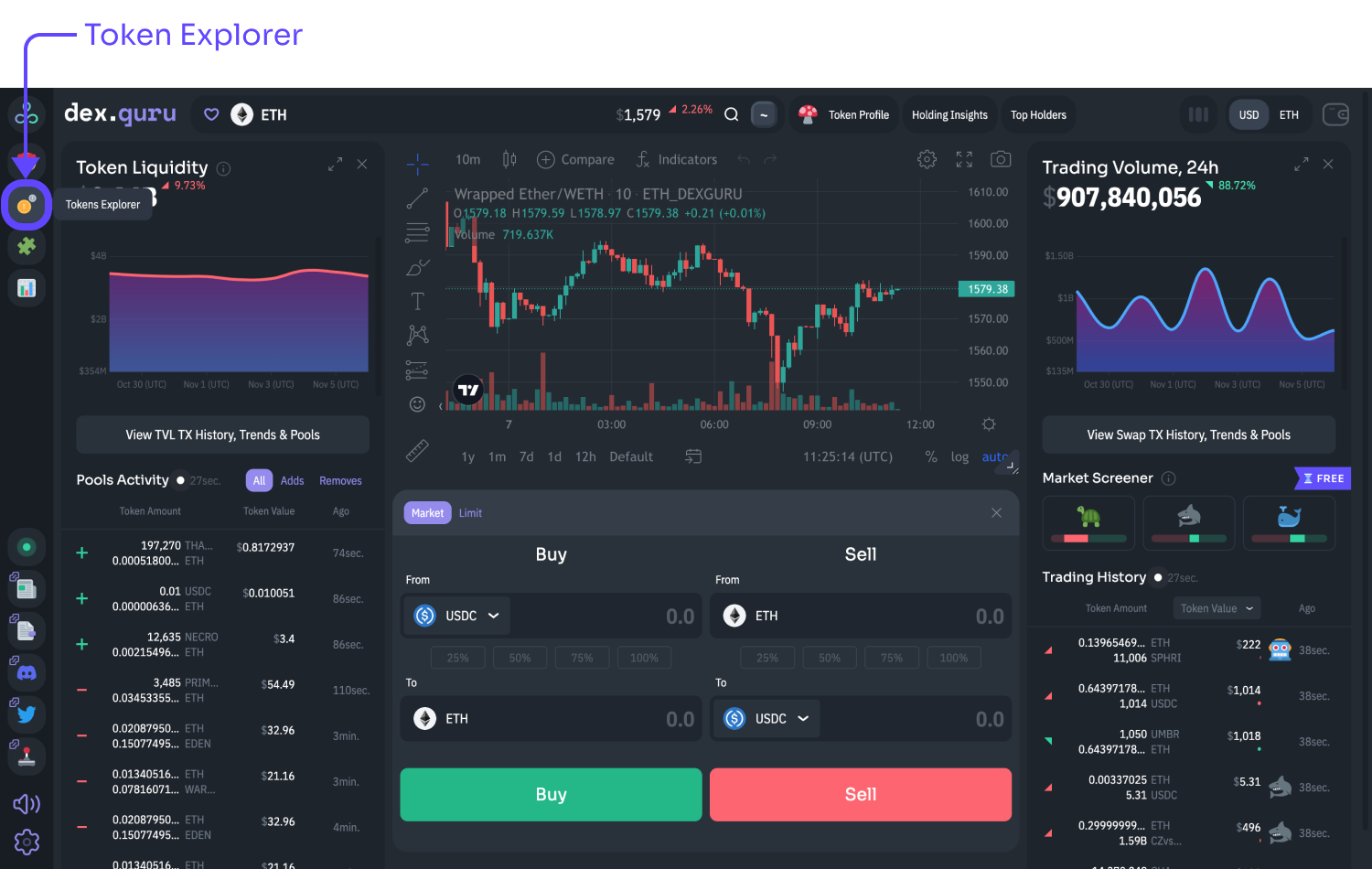
The [Token Explorer](https://dex.guru/tokens) page allows you to discover token tags. A tag can really be anything. It unites multiple tokens with similar qualities into one set.

Examples of token tags:

* Stablecoins
* Centralized Exchange
* Layer 2
* etc …

We encourage our community to participate in adding new tokens and new tags to our [Github repository.](https://github.com/dex-guru/tags)

Keep in mind, this is NOT investment advice, a stamp of approval, or any kind of recommendation.

To open Token Explorer, look for a coin emoji in the left sidebar.

<figure><img src="https://3551900137-files.gitbook.io/~/files/v0/b/gitbook-x-prod.appspot.com/o/spaces%2F-MO2nrmwh_DoxKc1v80n%2Fuploads%2FKTYd99E5PsHqLsP1Ldei%2Fimage.png?alt=media&amp;token=4a7536a1-7087-4da2-b0bf-2520e3bc1763" alt=""><figcaption></figcaption></figure>

You can combine tags by using the plus button in the top left corner of the Token Explorer page.

<figure><img src="https://3551900137-files.gitbook.io/~/files/v0/b/gitbook-x-prod.appspot.com/o/spaces%2F-MO2nrmwh_DoxKc1v80n%2Fuploads%2Fna1SzBYlhc5EdYLgv66V%2Fimage.png?alt=media&amp;token=cf047938-3fe6-45d6-9871-d20839c55237" alt=""><figcaption></figcaption></figure>


# Trading Tools

Once you connect your web3 wallet, you can exchange one crypto for another directly from the DexGuru interface in the Trading Section. Keep in mind that when you’re buying or selling crypto via our interface, you interact with smart contracts deployed on public chains like Ethereum or BSC. We do not control your transactions and couldn't stop a transaction or attempt to reverse a transaction after it occurred. You’re the only one ultimately responsible for any transactions. &#x20;

![](https://3551900137-files.gitbook.io/~/files/v0/b/gitbook-x-prod.appspot.com/o/spaces%2F-MO2nrmwh_DoxKc1v80n%2Fuploads%2F4fI4e0zFXF4yjjz4vzBe%2F001.png?alt=media\&token=599f9b3a-e773-4aa2-8db0-4a9432ddd012)

Use percentage buttons to allocate only that percentage of an asset from your wallet to a given trade. This way, you can sell 50% of all your tokens in 2 clicks. First, by pressing the 50% button and then the sell button.&#x20;

![Percentage buttons](https://3551900137-files.gitbook.io/~/files/v0/b/gitbook-x-prod.appspot.com/o/spaces%2F-MO2nrmwh_DoxKc1v80n%2Fuploads%2FowVZot9KvZTwH31q08Lm%2F002.png?alt=media\&token=89927d15-ef72-4fc2-8f28-4b68715bdf68)

If this is the first time you are making a transaction with a specific token, you’ll have to complete a token approval transaction. You only need to press Approve/Sell button once.&#x20;

![](https://3551900137-files.gitbook.io/~/files/v0/b/gitbook-x-prod.appspot.com/o/spaces%2F-MO2nrmwh_DoxKc1v80n%2Fuploads%2F61sKttjvA9dE5OqEl7Kq%2F003.png?alt=media\&token=b515d153-f341-42c4-9e06-b6821a8fbb2f)

Before finalizing a trade, it needs to be confirmed. Once you approve the token spending limit in your wallet (if needed), wait for the Swap Confirmation pop-up. Pay close attention to the Swap Confirmation pop-up shown below.

![](https://3551900137-files.gitbook.io/~/files/v0/b/gitbook-x-prod.appspot.com/o/spaces%2F-MO2nrmwh_DoxKc1v80n%2Fuploads%2Fr2BvEkBXV4FZ0Q1jc8gq%2F004.png?alt=media\&token=ecf45569-0a77-4695-9b82-bd687eb7ef9c)

Here you can set price slippage, which is a difference between the quoted price and the executed price of your trade.

A tip to DexGuru is optional. We don't charge you additional fees, but your tips are highly appreciated and support our development and help us build the best user experience for our traders.&#x20;

The price of Gas shown in GWEI reflects how fast your transaction mined on Ethereum Network. Gas is the fee a user pays to process a transaction on the Ethereum blockchain. Users send transactions with requested gas prices, and then miners choose which transactions they want to mine into a block. In this sense, Ethereum gas prices are dynamic, and the result of equilibrium is reached between what users bid and what miners accept on a rolling basis.

DexGuru will tell you if you are making a shitty trade by placing the 💩 emoji next to the estimated gas costs.&#x20;

💩 - shows up when an estimated network fee is more than 25% of the trade size.

The Swap Confirmation pop-up lets you know if you do not have sufficient balance to cover a transaction, including gas fees.&#x20;

![Insufficient balance](https://3551900137-files.gitbook.io/~/files/v0/b/gitbook-x-prod.appspot.com/o/spaces%2F-MO2nrmwh_DoxKc1v80n%2Fuploads%2FIZfJS17pouYmK8tGec9g%2F006.png?alt=media\&token=cdc827a8-a9f3-4b95-b38e-c6bb37c80be9)

We use [Meta-aggregation](/features/meta-aggregation) to route orders efficiently. You can also find more information about exchanges in our [Swapping Tokens](/more-info/swapping-tokens) article.&#x20;


# Cross-Chain Swaps

Cross-chain swaps on DexGuru are available inside [Trading Tools](/features/trading-tools). They are implemented using [LiFi](https://li.fi/) bridge aggregation protocol that supports swaps by aggregating [bridges](https://docs.li.fi/list-chains-bridges-dexs#bridges) and connecting them to [DEX aggregators](https://docs.li.fi/list-chains-bridges-dexs#exchanges).

<figure><img src="https://3551900137-files.gitbook.io/~/files/v0/b/gitbook-x-prod.appspot.com/o/spaces%2F-MO2nrmwh_DoxKc1v80n%2Fuploads%2FvwOAoc7chuvOdUReHLBC%2F001.png?alt=media&amp;token=defedf0b-8bb7-4d78-b914-a56337181703" alt=""><figcaption></figcaption></figure>

{% hint style="info" %}
If you are facing an issue with your cross-chain swap please [contact LiFi directly](https://lifihelp.zendesk.com/hc/en-us/articles/11158438085531-Where-can-I-get-real-time-support-). &#x20;
{% endhint %}

Note that cross-chain transactions take longer than single-chain ones. Sometimes you can receive a stablecoin token on the destination chain instead of the requested token. Unfortunately, we are unable to control this because this type of behavior comes directly from [LiFi](https://li.fi/).&#x20;

> If you want to debug your transaction use [LiFi Explorer](https://explorer.li.fi/) &#x20;

> Depending on route and bridge used for your swap, transactions could take **between 20-30 minutes and a few hours**


# Meta-aggregation

Meta-aggregation is a unique mechanism DexGuru uses to optimize trades and offer you the best rates. To start leveraging its power simply go to [Trading Tools](/features/trading-tools).&#x20;

## How does it work?

Supporting multiple decentralized exchange aggregators allows us to request a quote from each and provide you with a better option. We call it meta-aggregation. Moreover, this is an open-source feature, developers could easily add new order routing providers (DEX aggregators) using the following Github link <https://github.com/dex-guru/meta-aggregation-api>

<figure><img src="https://3551900137-files.gitbook.io/~/files/v0/b/gitbook-x-prod.appspot.com/o/spaces%2F-MO2nrmwh_DoxKc1v80n%2Fuploads%2FLgTWimHsxYD8ZmHZFZmX%2FRouter.png?alt=media&amp;token=f978be3f-b5d1-4151-9a03-fad02c4b031b" alt=""><figcaption></figcaption></figure>

Meta-aggregation is available for market orders on Ethereum, BSC, Polygon, Avalanche, Fantom, Arbitrum, Optimism, and CELO networks. We currently use 0x and 1inch protocols to provide this feature to you.

As a DexGuru user, you interact with multiple smart contracts depending on the router. You can find the list of them in the [Wallets, Security & More](/more-info/wallets-security-and-more)section.

“**Router”** is an exchange aggregator we use to request a quote.\
“**Via”** lists decentralized markets that **Router** is going to use for your order.

<figure><img src="https://3551900137-files.gitbook.io/~/files/v0/b/gitbook-x-prod.appspot.com/o/spaces%2F-MO2nrmwh_DoxKc1v80n%2Fuploads%2FzNpeFtvcvGG6H38YlbgD%2F01.png?alt=media&amp;token=ed645e93-f805-4bc6-95af-2a1926fb9121" alt=""><figcaption></figcaption></figure>

## How to change the router?&#x20;

You are not required to use the best router DexGuru suggests for you. You are free to change it at any time by clicking on the Router button.

<figure><img src="https://3551900137-files.gitbook.io/~/files/v0/b/gitbook-x-prod.appspot.com/o/spaces%2F-MO2nrmwh_DoxKc1v80n%2Fuploads%2FabKYS2kb74axcVYBr6ER%2F02.png?alt=media&amp;token=498c440f-37b3-4ccd-84fa-81fca9c0291f" alt=""><figcaption></figcaption></figure>

The Router button opens the Router Switch and lets you see quotes for each exchange aggregator. It will show you if a token approval is required or if you have already signed one for each aggregator. Pick any option you want, and do not forget to save it.

<figure><img src="https://3551900137-files.gitbook.io/~/files/v0/b/gitbook-x-prod.appspot.com/o/spaces%2F-MO2nrmwh_DoxKc1v80n%2Fuploads%2FK7DCdhph0EytFIDzG7ud%2F03.png?alt=media&amp;token=9a343a61-d280-4b04-a9a8-a89daace89b1" alt=""><figcaption><p>Router Switch</p></figcaption></figure>


# Limit Orders

A quick overview of limit orders on DexGuru

![](https://3551900137-files.gitbook.io/~/files/v0/b/gitbook-x-prod.appspot.com/o/spaces%2F-MO2nrmwh_DoxKc1v80n%2Fuploads%2FNukoLN3c9NhBBE1CoFGa%2Fimage.png?alt=media\&token=380e29d2-c9e0-4e2c-a0cd-c7f255ffe674)

{% hint style="info" %}
Even if the market price reaches your target price, there is no guarantee that your limit order will be filled.&#x20;

DexGuru routes all limit orders through 1inch Limit Order Protocol.
{% endhint %}

**What is a limit order?** \
A limit order has a target price and an expiration date. It is a request to buy or sell a token at a certain price that you can specify. When you place a limit order using DexGuru UI, it is sent to a centralized [1inch database](https://1inch.io/limit-order-protocol/). When you set a limit price and an expiration date, keep in mind that anyone can fetch your limit order using [1inch REST API endpoint ](https://docs.1inch.io/docs/limit-order-protocol/api/)to perform trade. Note that your limit order can sometimes be only partially filled.&#x20;

**What kind of assets can I use when submitting a limit order? Why can’t I use native ETH for limit orders?** \
Only ERC-20 tokens are supported when you request a limit order on DexGuru. For the Ethereum network, this implies that you can use [WETH](https://weth.io/) but not ETH when submitting a limit order. Native ETH has to be wrapped before you can use it for limit orders. You can sell ETH for WETH on [DexGuru](https://dex.guru/token/0xc02aaa39b223fe8d0a0e5c4f27ead9083c756cc2-eth). The same is true for Polygon network. You can't request limit orders using native MATIC, you have to use [WMATIC](https://polygonscan.com/token/0x0d500b1d8e8ef31e21c99d1db9a6444d3adf1270).&#x20;

**Why do I need to approve the token in my wallet before submitting my limit order?** \
Before submitting your limit order on DexGuru, you need to approve token spending from your wallet. This is done to protect your wallet from being accessed by any smart contract. This approval is an on-chain transaction, so you will have to pay gas fees. Only one approval is required per token, per wallet. However, since we use two different protocols for market orders vs. limit orders, you need to approve token sending for market and limit orders separately.

**What networks are supported?** \
Currently, you can request limit orders on Ethereum, BSC, Polygon, Optimism, Arbitrum, and Avalanche networks.

**Is there a gas fee for limit orders?** \
No, if your limit order gets filled or automatically expires, you do not pay gas fees. The taker of the order will have to consider gas fees, personal profit margin, and order size before completing your order. However, you pay gas fees when approving new token spending in your wallet or canceling a limit order before it expires.

**What does the percentage in the status column mean?** \
Limit orders can be partially filled. For example, a taker of your order might only fill 50% of your limit order before it expires.&#x20;

**Can I cancel my limit order?** \
Yes, you can manually cancel a limit order before it expires. However, it will require an on-chain transaction, and you will be charged a gas fee.

**Why did my order never get filled?** \
There are several reasons for this. The target price might not have been reached. Secondly, there might be no taker for your order because it is not profitable for them or simply because of a low trading volume. Thirdly, you have insufficient funds in your wallet.

**Confirm Limit Order**&#x20;

Always pay attention to "**You receive**" at Confirm limit order screen! It is what you will get if your order is filled. When you click a green Confirm button, you agree to swap amount IN(You pay) for amount OUT(You receive), within Expiration time.&#x20;

<figure><img src="https://3551900137-files.gitbook.io/~/files/v0/b/gitbook-x-prod.appspot.com/o/spaces%2F-MO2nrmwh_DoxKc1v80n%2Fuploads%2FWMbT1OuDC96OA72OqXS2%2F_40_72_SROCKET_Price_to_USD_%E2%80%93_Live_SROCKET_Charts_Today_at_DexGuru.png?alt=media&amp;token=46f19b54-33eb-4993-b540-bd5be852253a" alt=""><figcaption></figcaption></figure>

**Stop-Loss orders**

You can't use Limit orders with a price below the current market price. If you set a price lower, it will simply mean that you are willing to sell tokens for less than they cost on the market. Most likely, this order will execute immediately with a loss of $-value for you.


# Multi-Chart

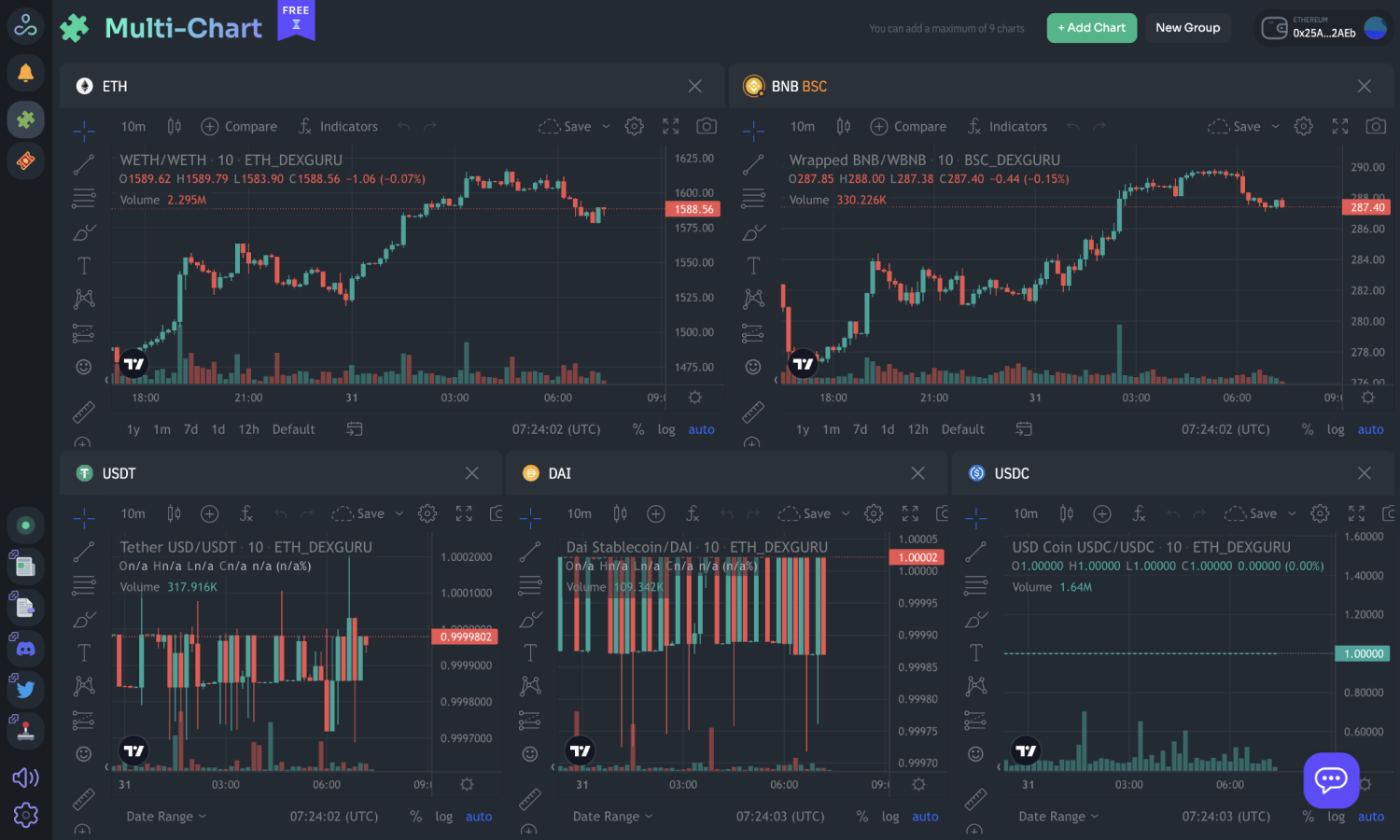
Analyze and customize multiple token charts inside just one tab.

<figure><img src="https://3551900137-files.gitbook.io/~/files/v0/b/gitbook-x-prod.appspot.com/o/spaces%2F-MO2nrmwh_DoxKc1v80n%2Fuploads%2FTTbjvk2sMzoD4pvR3TG8%2F001.png?alt=media&amp;token=2028cb9e-0232-446f-a2d8-3273bebb46cf" alt=""><figcaption></figcaption></figure>

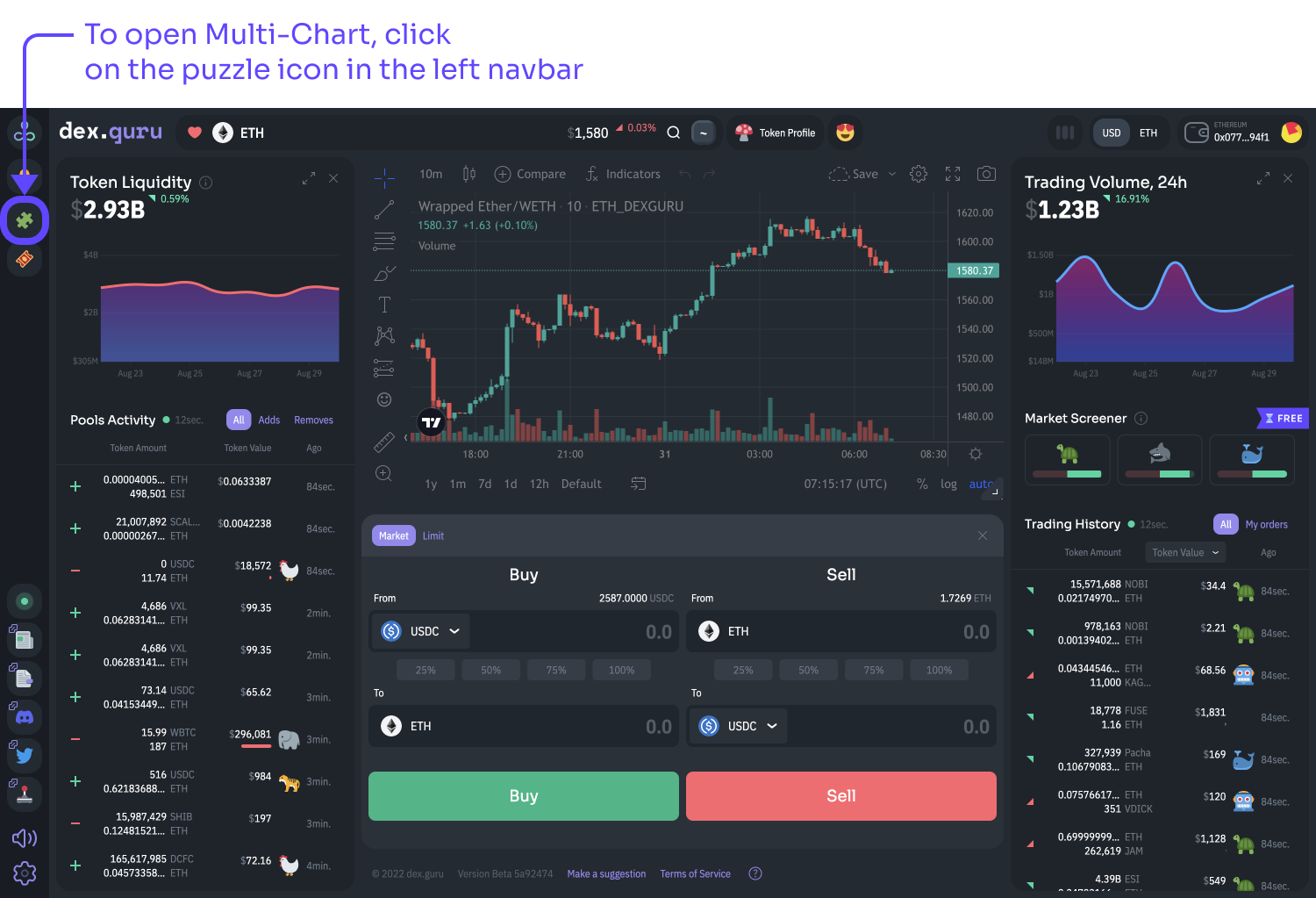
To **open Multi-Chart**, click on the puzzle 🧩 icon in the left navbar.

<figure><img src="https://3551900137-files.gitbook.io/~/files/v0/b/gitbook-x-prod.appspot.com/o/spaces%2F-MO2nrmwh_DoxKc1v80n%2Fuploads%2FEtKSEgE1b8SHMMLDX0f0%2F002.png?alt=media&amp;token=f2834d59-64f4-42a2-99b4-d3e432cf1b17" alt=""><figcaption></figcaption></figure>

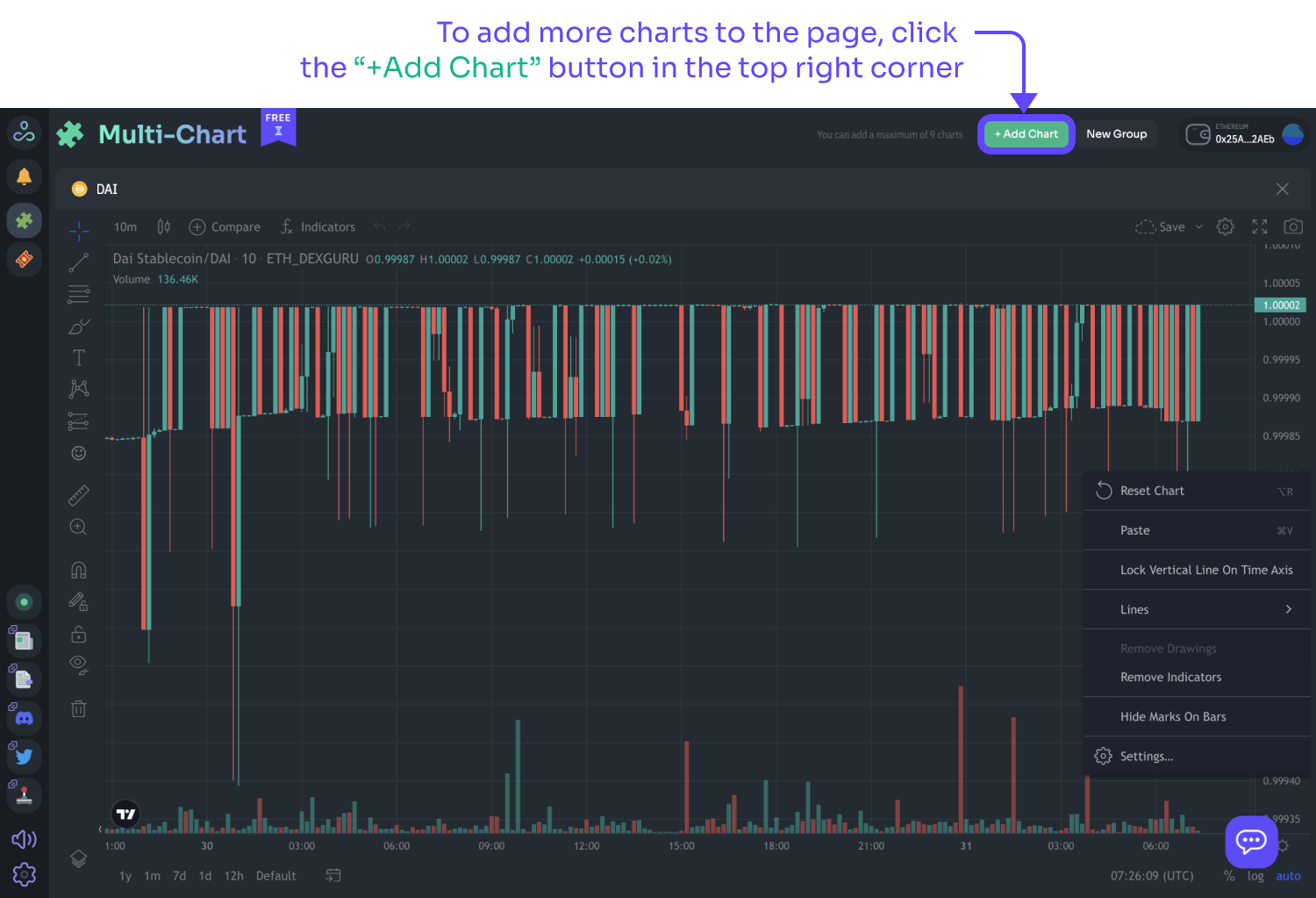
To **add more charts to the page**, click the “+Add Chart” button in the top right corner.

<figure><img src="https://3551900137-files.gitbook.io/~/files/v0/b/gitbook-x-prod.appspot.com/o/spaces%2F-MO2nrmwh_DoxKc1v80n%2Fuploads%2FaeMhHVfVFau6CvyVCo1M%2F003.png?alt=media&amp;token=00727fdb-78cb-4efa-9b95-a4ebf49afb1b" alt=""><figcaption></figcaption></figure>

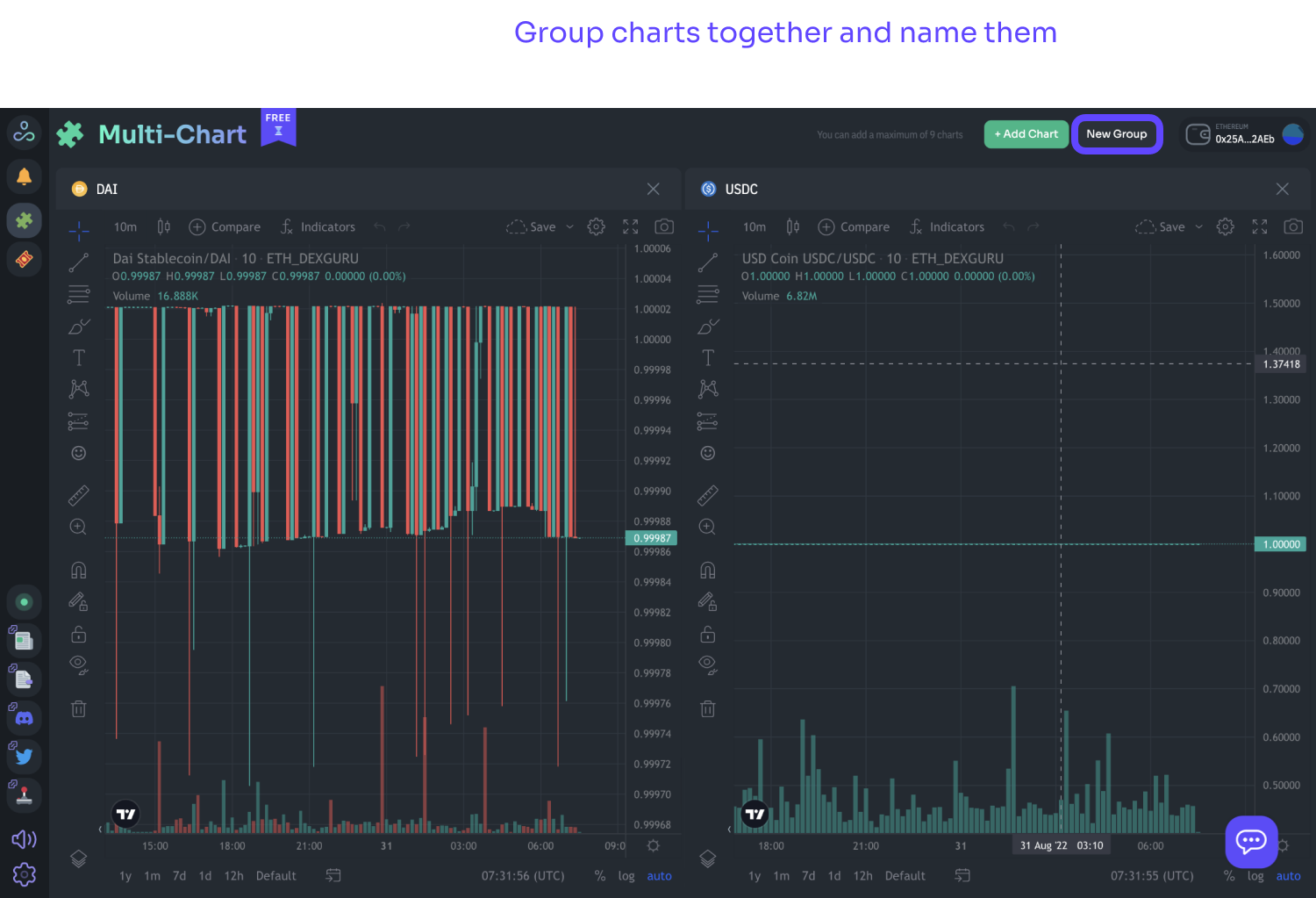
**Group charts together** and name them.

<figure><img src="https://3551900137-files.gitbook.io/~/files/v0/b/gitbook-x-prod.appspot.com/o/spaces%2F-MO2nrmwh_DoxKc1v80n%2Fuploads%2FapsZtL6CTEPUhtas3e5r%2F004.png?alt=media&amp;token=1028e743-5e16-4a5c-855d-bdea962365bb" alt=""><figcaption></figcaption></figure>

**Create a new group** without losing old group settings.

<figure><img src="https://3551900137-files.gitbook.io/~/files/v0/b/gitbook-x-prod.appspot.com/o/spaces%2F-MO2nrmwh_DoxKc1v80n%2Fuploads%2FDIt5BupmpFuHIzKqwSpd%2F005.png?alt=media&amp;token=3dc482c9-3d09-4d72-b1ad-a0378b93bfbb" alt=""><figcaption></figcaption></figure>

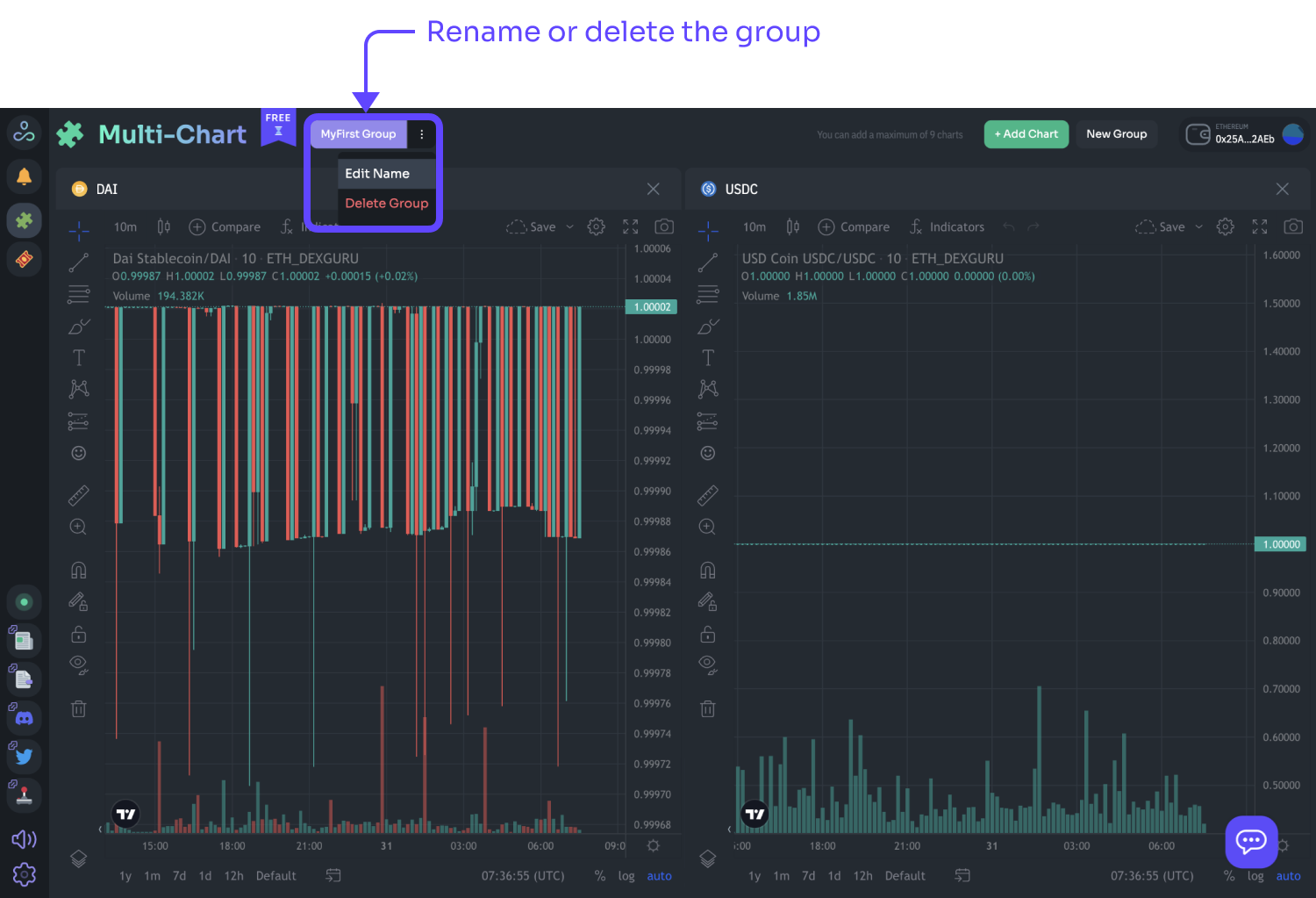
**Rename or delete the group** by clicking three dots right next to the group name.

<figure><img src="https://3551900137-files.gitbook.io/~/files/v0/b/gitbook-x-prod.appspot.com/o/spaces%2F-MO2nrmwh_DoxKc1v80n%2Fuploads%2FgjAMQoQDaNg6A8uHgubj%2F006.png?alt=media&amp;token=13322007-7aa5-4edb-9b9b-e7240a5b7e83" alt=""><figcaption></figcaption></figure>

Feel free to close Multi-Chart; the **settings are always saved**.


# Alerts & Notifications

Never miss an opportunity with DexGuru price notifications

The Alerts & Notifications🔔 button is located in the top right corner. Currently, we support 3 types of alerts:&#x20;

1. [Favorite Accounts Activity Alerts](#favorite-accounts-activity-alerts)
2. [Token Price Changes for Favorite Tokens ](#token-price-changes-for-favorite-tokens)
3. Single Token Price Alert&#x20;

<figure><img src="https://3551900137-files.gitbook.io/~/files/v0/b/gitbook-x-prod.appspot.com/o/spaces%2F-MO2nrmwh_DoxKc1v80n%2Fuploads%2F2n4PNhxTZyAxO8rjPcPx%2Fimage.png?alt=media&amp;token=fe733367-59e0-4b29-8e3d-29a2cd699a47" alt=""><figcaption></figcaption></figure>

### Favorite Accounts Activity Alerts

Set up notifications for accounts that are inside your Favorites.&#x20;

{% embed url="<https://www.youtube.com/watch?v=mWBhl2N1WqU>" %}

### Token Price Changes for Favorite Tokens&#x20;

Token price alerts are available for you after you connect your wallet.&#x20;

By default, notifications are turned on for your Favorites😍 with a 10% threshold. Anytime one of the tokens from your Favorites😍 changes the price by more than 10% in 30 minutes, you will receive a notification inside Alerts & Notifications section.

<figure><img src="https://3551900137-files.gitbook.io/~/files/v0/b/gitbook-x-prod.appspot.com/o/spaces%2F-MO2nrmwh_DoxKc1v80n%2Fuploads%2FMCunP3GFYF03OSCbAyzq%2Fimage.png?alt=media&amp;token=05f77285-d796-4766-8a78-ee8da6c431ca" alt=""><figcaption></figcaption></figure>

You can change the 10% threshold by going to My Alerts and looking for the edit icon(which looks like a pencil).&#x20;

<figure><img src="https://3551900137-files.gitbook.io/~/files/v0/b/gitbook-x-prod.appspot.com/o/spaces%2F-MO2nrmwh_DoxKc1v80n%2Fuploads%2FdbtwWA36KDjFMmSkRT6j%2FScreen%20Shot%202022-10-04%20at%202.57.41%20PM.png?alt=media&amp;token=7839ee7a-ed63-4036-96c0-64e1d631901b" alt=""><figcaption><p>Customize the threshold</p></figcaption></figure>

Besides seeing price notifications for your Favorites😍 inside DexGuru's interface, you can receive them straight to your Telegram account. Read how to set up Telegram notifications [here](/how-to/enable-telegram-price-alerts) or watch a video [here](https://www.youtube.com/watch?v=PobSLoS2YRg).&#x20;


# Trading Volume and History

and trading volume

<figure><img src="https://3551900137-files.gitbook.io/~/files/v0/b/gitbook-x-prod.appspot.com/o/spaces%2F-MO2nrmwh_DoxKc1v80n%2Fuploads%2FZArtWZTVIQwH1D4vY6Dh%2FScreen%20Shot%202023-01-18%20at%206.03.20%20PM.png?alt=media&amp;token=9dba7db5-3b16-42f2-880d-77c82a1824a8" alt=""><figcaption></figcaption></figure>

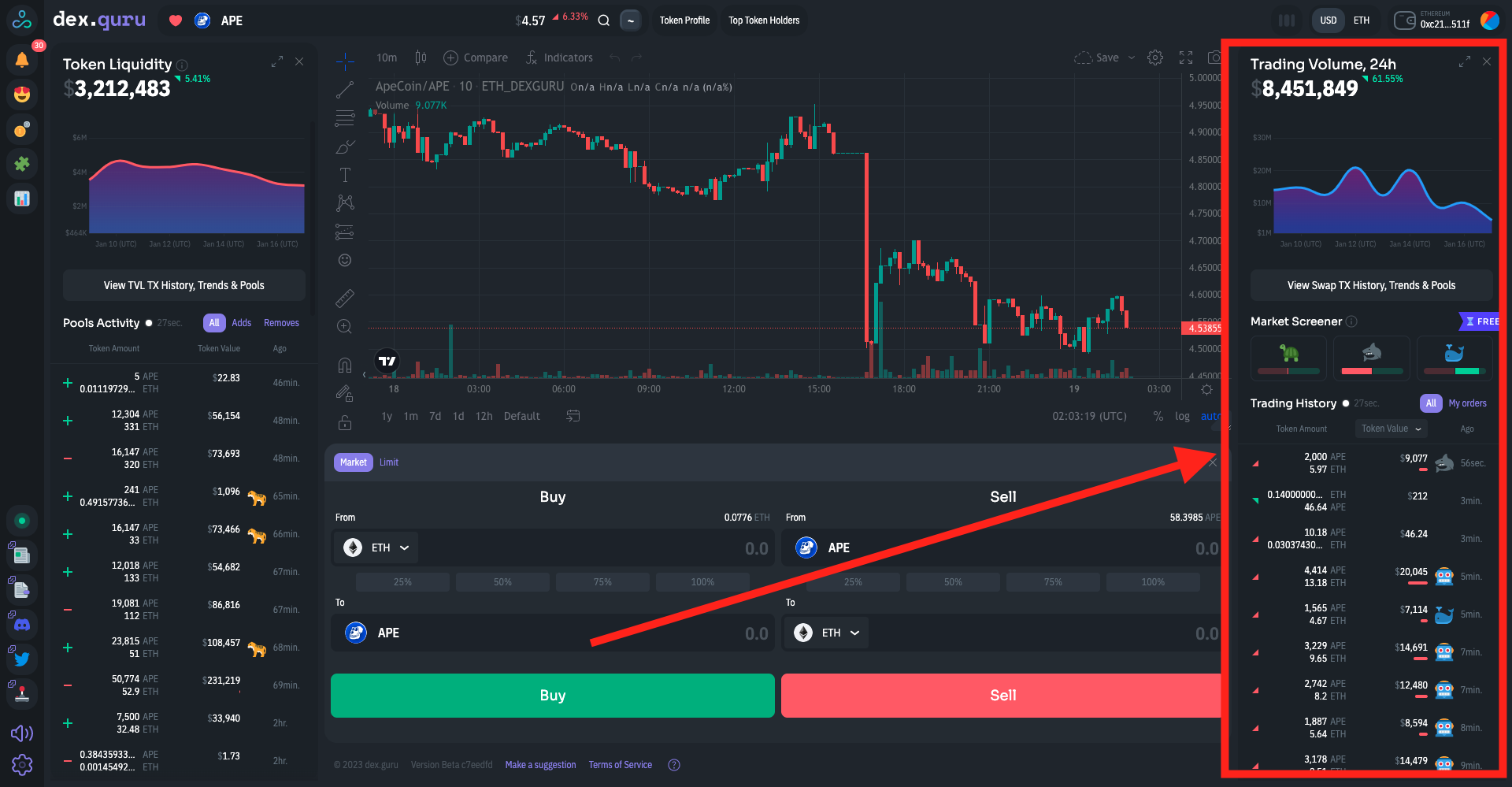
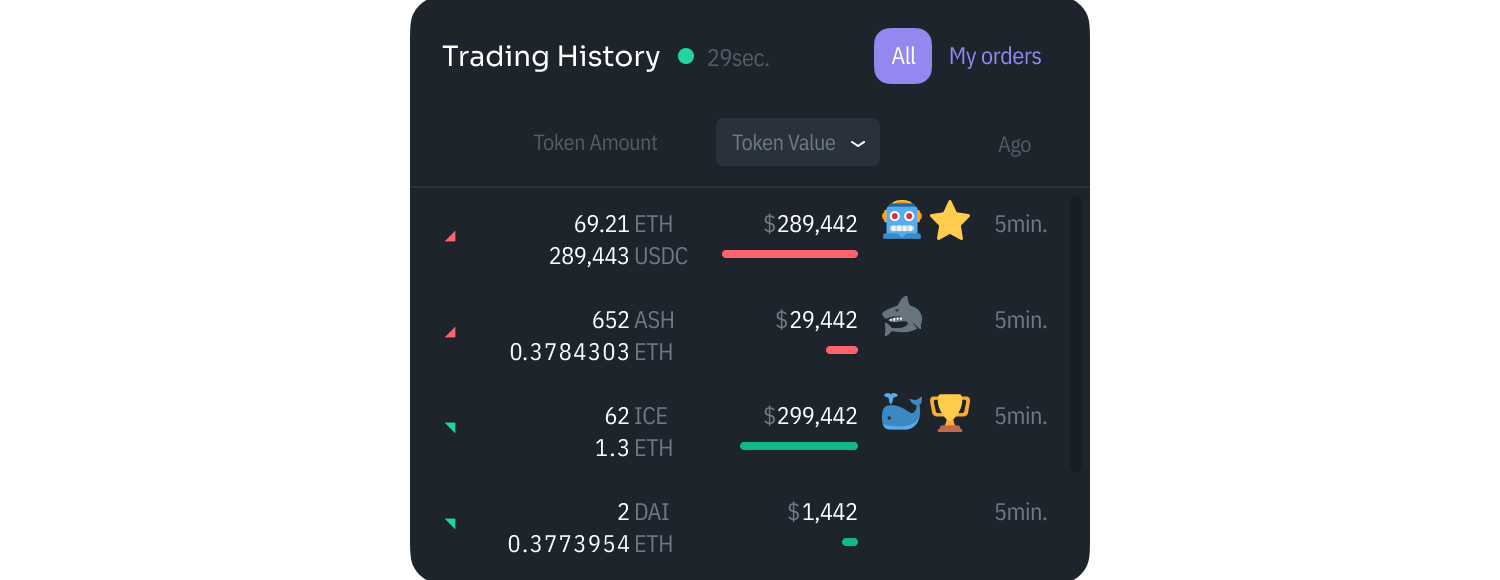
You can see a real-time transaction flow in our Trading History area.&#x20;

A green arrow up indicates a transaction was a buy; a red arrow down means it was a sell.&#x20;

If we have enough data about the wallet that a trader used, we will add an icon to the transaction indicating the type of trader.&#x20;

#### **Icons**

🐢 - Casual Trader with $10k-$100k of a trading volume in the last 30 days

🦈 - Active Trader with $100k-$500k of a trading volume in the last 30 days

🐳 - Heavy Trader with $500k+ of a trading volume in the last 30 days

🤖 - Trader with 1000+ TXs in the last 30 days. Most likely a bot.<br>

<figure><img src="https://3551900137-files.gitbook.io/~/files/v0/b/gitbook-x-prod.appspot.com/o/spaces%2F-MO2nrmwh_DoxKc1v80n%2Fuploads%2FimeUuJp8UFmXPXqHkPfK%2FMarket%20Activity%2002.png?alt=media&amp;token=5dfbec0c-25be-4f70-a8c3-f8f9de44dfab" alt=""><figcaption></figcaption></figure>


# Token Liquidity

and Pools Activity

<figure><img src="https://3551900137-files.gitbook.io/~/files/v0/b/gitbook-x-prod.appspot.com/o/spaces%2F-MO2nrmwh_DoxKc1v80n%2Fuploads%2FkcvtIyEmKHkPtY0q6OhL%2FScreen%20Shot%202023-01-18%20at%206.01.20%20PM.png?alt=media&amp;token=350f05e3-e428-409e-a2bb-bd2017c0f52f" alt=""><figcaption></figcaption></figure>

We measure liquidity $ value for a token, not for a trading pair. When determining how liquid a token is, we don’t really care about how much of that token is in liquidity pools, we care about the value of other tokens that it can be swapped for.&#x20;

{% hint style="info" %}
To determine a liquidity value for a given token X, we look across [supported liquidity pools](https://docs.dex.guru/data/supported-dexs-amms) and calculate the amounts of available tokens you can swap with token X. Then, to get the liquidity of token X, we multiply these available tokens by their corresponding USD prices and sum it all up.
{% endhint %}

The simple formula that works for all pool types that we are using is:

***Liquidity of token X = TVL of all pools containing token X minus the total value of token A in those pools***

Which can also be written as:

***Liquidity of token X = total value of all other tokens in pools containing token x***

This left section of the DexGuru interface shows available on-chain token liquidity and AMM’s pool activity. It shows when and how many tokens are deposited or removed from the liquidity pools for the given token.&#x20;

![](https://3551900137-files.gitbook.io/~/files/v0/b/gitbook-x-prod.appspot.com/o/spaces%2F-MO2nrmwh_DoxKc1v80n%2Fuploads%2FKQdHQcKJhx5sCnIOWsOi%2FToken%20Liquidity%2001.png?alt=media\&token=cea933f1-851f-4d51-a359-6de7be1c68ed)

To specify the token, pick it in the [Market Selector](https://docs.dex.guru/features/market-selector) area.&#x20;

![
](https://3551900137-files.gitbook.io/~/files/v0/b/gitbook-x-prod.appspot.com/o/spaces%2F-MO2nrmwh_DoxKc1v80n%2Fuploads%2F43YEabfoxa3nl0fGvk5f%2FToken%20Liquidity%2001.png?alt=media\&token=e75ac92f-ecbe-45b9-b459-f8e6b1d2cc69)

### Liquidity Provider Categories

provides you with insight into what type of accounts are liquidity providers for the selected token

![](https://3551900137-files.gitbook.io/~/files/v0/b/gitbook-x-prod.appspot.com/o/spaces%2F-MO2nrmwh_DoxKc1v80n%2Fuploads%2FK02dfjM68DfcVdtn47Ep%2FToken%20Liquidity%203.png?alt=media\&token=b1d86f00-8b66-4bbb-b89c-af0b73ab3882)

🐓 (Rooster) - During the last 30 days, this Liquidity Provider continuously has had $10k-$100k locked inside different liquidity pools across all supported chains.

🐅 (Tiger) - During the last 30 days, this Liquidity Provider continuously has had $100k-$500k locked inside different liquidity pools across all supported chains.

🐘 (Elephant) - During the last 30 days, this Liquidity Provider continuously has had $500k+ locked inside different liquidity pools across all supported chains.


# Market Screener

Market Screener reveals when traders' 24h volume is near its selling or buying maximum over the last 30 days.

<figure><img src="https://3551900137-files.gitbook.io/~/files/v0/b/gitbook-x-prod.appspot.com/o/spaces%2F-MO2nrmwh_DoxKc1v80n%2Fuploads%2FHhG9FZmdhgnB3Nmw6Tp9%2FScreen%20Shot%202023-01-18%20at%206.05.22%20PM.png?alt=media&amp;token=9a3b1a12-2c6c-47b5-b47b-62a064282adc" alt=""><figcaption></figcaption></figure>

Types of traders:&#x20;

🐢 - **Turtles** a.k.a. Casual Traders with $10k-$100k of a trading volume in the last 30 days‌

🦈 - **Sharks** a.k.a. Active Traders with $100k-$500k of a trading volume in the last 30 days‌

🐳 - **Whales** a.k.a. Heavy Traders with $500k+ of a trading volume in the last 30 days

## How is the Market Screener bar calculated?&#x20;

Market Screener is an indicator based on a [stochastic oscillato](https://en.wikipedia.org/wiki/Stochastic_oscillator)r and our custom metrics ***m*** and ***s***. Market Screener reveals when traders' 24h volume is near its selling or buying maximum over the last 30 days.

1. We calculate the custom metric m for every 24h. <br>

   <figure><img src="https://3551900137-files.gitbook.io/~/files/v0/b/gitbook-x-prod.appspot.com/o/spaces%2F-MO2nrmwh_DoxKc1v80n%2Fuploads%2FpBWhZ1GmnVp5qK1v2Uic%2F002.png?alt=media&amp;token=c2d255c7-e2e2-47a6-a16e-c319b1c0b648" alt=""><figcaption></figcaption></figure>
2. We determine the length of the market screener bar by comparing the current metric ***m*** with previous ***m\_min*** and ***m\_max*** values over the last 30 days. <br>

   <figure><img src="https://3551900137-files.gitbook.io/~/files/v0/b/gitbook-x-prod.appspot.com/o/spaces%2F-MO2nrmwh_DoxKc1v80n%2Fuploads%2FB0CrFcXZS5YdYwEaQelN%2F003.png?alt=media&amp;token=5674ca10-f7f3-4774-88ad-0922262074d2" alt=""><figcaption></figcaption></figure>
3. If ***s*** < 0.5, the bar is red and the 24h trading volume is closer to its minimum over the last 30 days. If ***s*** > 0.5 then the bar is green and the 24h trading volume is closer to its maximum over the last 30 days.<br>

   <figure><img src="https://3551900137-files.gitbook.io/~/files/v0/b/gitbook-x-prod.appspot.com/o/spaces%2F-MO2nrmwh_DoxKc1v80n%2Fuploads%2FGU4S7CzpQroscn1pvvJm%2F004.png?alt=media&amp;token=0f9704ca-7148-4182-814f-b03047c10787" alt=""><figcaption></figcaption></figure>

\ <br>


# Market Selector

Explore on-chain markets in the top left corner. It will show the name of a token, its volume over the last 24 hours, and its price. You can search for tokens and add them to your favorites by pressing the heart button.&#x20;

<figure><img src="https://3551900137-files.gitbook.io/~/files/v0/b/gitbook-x-prod.appspot.com/o/spaces%2F-MO2nrmwh_DoxKc1v80n%2Fuploads%2FylyUGTeksv9sysDDahJt%2FScreen%20Shot%202023-01-18%20at%206.20.29%20PM.png?alt=media&amp;token=59bb221f-499a-4eba-aea6-718501431b08" alt=""><figcaption></figcaption></figure>

Note: Some of our features are only available once you connect a wallet. After connecting it, you will be able to save your favorite tokens by pressing a heart button. DexGuru is a fully non-custodial platform, so the assets in your wallet are always under your control.<br>

Inside Market Selector, you can also see assets at your connected wallet by pressing under the wallet tab. <br>

![](https://3551900137-files.gitbook.io/~/files/v0/b/gitbook-x-prod.appspot.com/o/spaces%2F-MO2nrmwh_DoxKc1v80n%2Fuploads%2FyfIqD8tWBnHNVga3qmMi%2FMarket%20Selector%2001.png?alt=media\&token=3dde13d2-0948-490e-ac2e-0062209f846b)

There is no need to use your computer mouse to open our Market Selector; use hotkeys instead. Just press the \~ key to open it. Use ↑  ↓ and ESC keys to navigate around and close the Market Selector.&#x20;

![](https://3551900137-files.gitbook.io/~/files/v0/b/gitbook-x-prod.appspot.com/o/spaces%2F-MO2nrmwh_DoxKc1v80n%2Fuploads%2FXrkGW8uFs5N9H04WmQ6M%2FMarket%20Selector%2002.png?alt=media\&token=6ef73813-d9f8-4829-8f2e-fbf78bfd3acc)

## What is the "Full Degen Mode" ?

![](https://3551900137-files.gitbook.io/~/files/v0/b/gitbook-x-prod.appspot.com/o/spaces%2F-MO2nrmwh_DoxKc1v80n%2Fuploads%2FulkHmlSZDTCtjuqEbaSH%2FFull%20Degen%20Mode.png?alt=media\&token=b8476333-1dcb-460f-8a9b-8cc9ed5d6fd3)

Tokens that are fall under the Full Degen Mode in the [Market Selector](/features/market-selector) are tokens that are not on at least one verified Token List.&#x20;

For detailed and complete information about Full Degen mode and token lists, please visit:

* [FAQ](/general/faq#what-is-the-full-degen-mode-inside-the-market-selector)&#x20;
* [FAQ](/general/faq#what-exactly-are-token-lists)
* [FAQ](/general/faq#how-we-use-token-lists-on-dexguru)


# Trending Tab

Trending Tab shows tokens where Whale 🐳 buyers are strongly dominating over Whale 🐳 sellers.

![Trending Tab is located inside the Market Selector](https://3551900137-files.gitbook.io/~/files/v0/b/gitbook-x-prod.appspot.com/o/spaces%2F-MO2nrmwh_DoxKc1v80n%2Fuploads%2FZ6mbNNR4TVA7lsgCF684%2FTrending%20Tab%2001.png?alt=media\&token=4e4ae141-ac9c-44ae-b6ce-21ffc0e3496a)

**Which tokens get listed inside the Trending Tab?**

The formula below shows how we calculate the *m* value for each day. The *m* value is the metric we use for the [Market Screener](https://docs.dex.guru/features/market-activity/market-screener). To pick tokens for the Trending Tab, we compare the current Market Screener (*m*) metric to the largest *m* value over the last 30 days. Below is the formula for the *m* value over 24 hours.&#x20;

![Market Screener formula](https://3551900137-files.gitbook.io/~/files/v0/b/gitbook-x-prod.appspot.com/o/spaces%2F-MO2nrmwh_DoxKc1v80n%2Fuploads%2FannjIjQL0DaIRP24fEvz%2FTrending%20Tab%2002.png?alt=media\&token=dd822fff-24e0-4bce-b3bf-6dae6493d618)

The value m represents the difference between buy volume and sell volume of Whale 🐳 traders (heavy Trader with $500k+ of a trading volume in the last 30 days) in the previous 24 hours. The m value is similar to the [Speculative Sentiment Index](https://www.fxcm.com/markets/insights/speculative-sentiment-index-ssi/). The ratio inside the formula determines if the m value is positive or negative. If m is positive, more tokens have been bought than sold by Whale 🐳 traders and vice versa. We multiply the ratio by the number of Whale 🐳 traders to filter tokens with a high probability of manipulation. For example, when one Whale trader buys most of the token’s supply to drive the price up. <br>

When we calculate the Trending Tab, we consider the maximum and the minimum *m* values for the previous 30 days. We use the below k indicator similar to the [stochastic oscillator](https://en.wikipedia.org/wiki/Stochastic_oscillator) to determine what tokens we list in the Trending tab. The k indicator value can be between 0 and 100. When *k* is bigger than 60, the token is considered for the Trending tab. The *k* indicator shows how close the current *m* value is to the maximum *m* over the previous 30 days. We only list tokens with positive *m* value, where Whale 🐳 buyers strongly dominate Whale 🐳 sellers.

![k indicator](https://3551900137-files.gitbook.io/~/files/v0/b/gitbook-x-prod.appspot.com/o/spaces%2F-MO2nrmwh_DoxKc1v80n%2Fuploads%2FyGOEIsqNgGuYIoELI0Dk%2FTrending%20Tab%2003.png?alt=media\&token=cbdbaf3c-0c61-4133-b9b5-d3c67cfdcaac)


# Network Switch

We support multiple EVM-compatible chains. We have an ecosystem switch inside Market Selector that helps you easily navigate between them. For example, you can filter tokens to only show the ones on the Avalanche network. &#x20;

![](https://3551900137-files.gitbook.io/~/files/v0/b/gitbook-x-prod.appspot.com/o/spaces%2F-MO2nrmwh_DoxKc1v80n%2Fuploads%2FKWtKWgMIWIF1EnFuB30K%2FNetwork%20Switch.png?alt=media\&token=ce64ca47-9a62-4c74-95d2-08f0921e2852)


# Multichain

At DexGuru, we believe in EVM-compatible chains. Currently, we support Ethereum assets ERC-20, Binance Smart Chain assets BEP-20, Polygon Network (previously Matic Network), Avalanche, Fantom, Arbitrum, Optimism, Gnosis, and Celo network assets. <br>

To trade tokens of a different network, connect a wallet that supports the specific network or change network settings in your wallet. For Metamask network selector looks like this:

![Metamask network selector](https://3551900137-files.gitbook.io/~/files/v0/b/gitbook-x-prod.appspot.com/o/spaces%2F-MO2nrmwh_DoxKc1v80n%2Fuploads%2FqQpsuLt1QhACyWkgVd3w%2FMultichain%2001.png?alt=media\&token=72326eb2-cab4-4ec9-99be-992105c9a275)

To identify tokens from different networks, we use colored circles around the token’s icon. In the example below, Binance Smart Chain is wrapped in the orange circle. For your convenience, web3 wallets that are connected, displayed in the same color as the circles around specific networks.&#x20;

![Market Selector identifies BSC network with orange color](https://3551900137-files.gitbook.io/~/files/v0/b/gitbook-x-prod.appspot.com/o/spaces%2F-MO2nrmwh_DoxKc1v80n%2Fuploads%2FO4Bv7Uooh9S3pr9X4mkA%2FMultichain%202.png?alt=media\&token=97bb0d34-a037-4dd9-8ee2-dc9105550adf)

\
\
Note: You can't trade assets from different networks for each other. For example,  you can't trade UNI(ERC20 token on Ethereum) for CAKE (BEP20 token on BSC). However, many Ethereum based tokens have pegged versions on BSC, for example, ETH-BSC on a screenshot above.

{% hint style="info" %}
**PRO tip**: Use [Network Switch](/features/network-switch) to filter tokens by chain
{% endhint %}


# Charting

analyze market data to pinpoint optimal entry and exit points for your trades

<figure><img src="https://3551900137-files.gitbook.io/~/files/v0/b/gitbook-x-prod.appspot.com/o/spaces%2F-MO2nrmwh_DoxKc1v80n%2Fuploads%2F4FLt2Feo7knSjxk4TWpR%2FScreen%20Shot%202022-09-12%20at%206.23.08%20PM.png?alt=media&amp;token=393f8fe1-3033-4694-a92f-06e85127d7bb" alt=""><figcaption></figcaption></figure>

#### Learn more about how price charts are displayed on DexGuru [here](/more-info/price-charts).&#x20;

#### Learn more about DexGuru's custom chart indicators [here.](/features/custom-chart-indicators)&#x20;

We use the [TradingView](https://www.tradingview.com/) platform to provide you with the best charting experience.&#x20;


# Custom Chart Indicators

At DexGuru we always strive to provide the best data for our users. We went as far as adding our custom indicators to charting.&#x20;

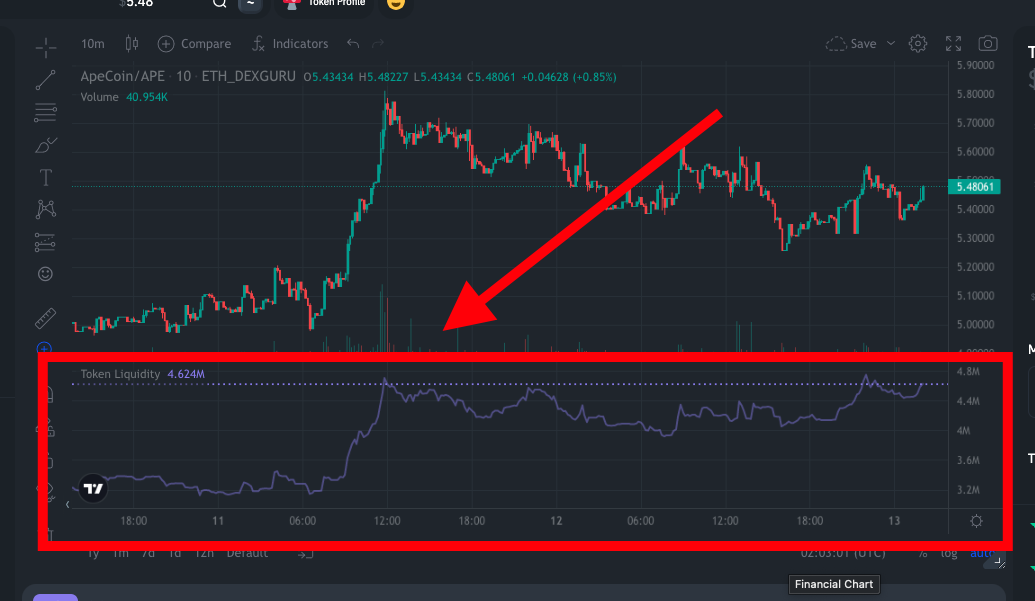
### **Token Liquidity Indicator**&#x20;

Allows you to directly see the token's liquidity over time on the chart. Learn more about how we calculate liquidity [here](/features/token-liquidity). &#x20;

<figure><img src="https://3551900137-files.gitbook.io/~/files/v0/b/gitbook-x-prod.appspot.com/o/spaces%2F-MO2nrmwh_DoxKc1v80n%2Fuploads%2FPpF8dw6yjT7eYvRuWL6W%2FScreen%20Shot%202022-09-12%20at%207.03.01%20PM.png?alt=media&amp;token=9bf9be58-9f5e-419d-80ec-67afef4115d2" alt=""><figcaption></figcaption></figure>

### **Whales Volume Indicator**&#x20;

Reflects the trading volume by **Whales** 🐳 (heavy Traders with $500k+ of trading volume in the last 30 days).&#x20;

The formula is calculated in USD and uses only transactions by **Whales** 🐳.

<figure><img src="https://3551900137-files.gitbook.io/~/files/v0/b/gitbook-x-prod.appspot.com/o/spaces%2F-MO2nrmwh_DoxKc1v80n%2Fuploads%2FKHLT5bSmDwDkCnDZXmPe%2FScreen%20Shot%202022-11-29%20at%2011.11.59%20AM.png?alt=media&amp;token=1fd43960-8b8d-4a17-8f04-0be4603d4640" alt=""><figcaption><p>Whales Volume indicator formula</p></figcaption></figure>

<figure><img src="https://3551900137-files.gitbook.io/~/files/v0/b/gitbook-x-prod.appspot.com/o/spaces%2F-MO2nrmwh_DoxKc1v80n%2Fuploads%2FrPdBnQPvNEoBcJJfXmaY%2FScreen%20Shot%202022-11-29%20at%2011.25.57%20AM.png?alt=media&amp;token=48f8dfba-d2c0-4ee0-88cd-89abcc9f48dd" alt=""><figcaption><p>Whlaes Volume indicator</p></figcaption></figure>

### To add custom indicators to your chart:&#x20;

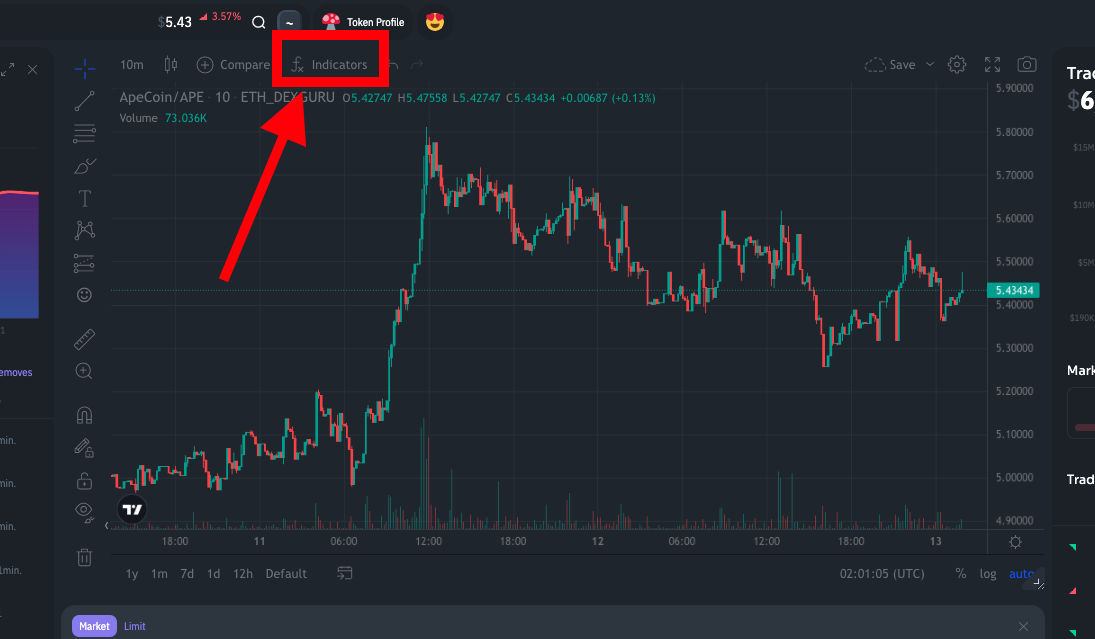
1. Go to Indicators&#x20;

   <figure><img src="https://3551900137-files.gitbook.io/~/files/v0/b/gitbook-x-prod.appspot.com/o/spaces%2F-MO2nrmwh_DoxKc1v80n%2Fuploads%2FMrYte06yIb0ZmJkZ46pF%2FScreen%20Shot%202022-09-12%20at%207.01.06%20PM.png?alt=media&amp;token=7ec14e0d-4f0b-4801-a7a2-1e0957ff0740" alt=""><figcaption></figcaption></figure>
2. Look for the script names called "Token Liquidity" and "Whales Volume"

   <figure><img src="https://3551900137-files.gitbook.io/~/files/v0/b/gitbook-x-prod.appspot.com/o/spaces%2F-MO2nrmwh_DoxKc1v80n%2Fuploads%2FwdgZLX6UFtonagKZfSov%2FScreen%20Shot%202022-09-12%20at%206.59.42%20PM.png?alt=media&amp;token=643501a5-c020-4548-ad83-7dc4d9154afe" alt=""><figcaption></figcaption></figure>

### &#x20;


# Connect your Wallet

Some of our features are only available once you connect a wallet. Connecting your wallet provides you complete access to the DexGuru platform, enabling you to:

* Add tokens to your own Favorites list
* Sync your Favorites list across all your devices *(via connecting with the same wallet)*
* Buy and Sell tokens directly on DexGuru
* Setup Price Alerts through Push Notifications
* [Trader Profile](/features/account-profile)
* [Token Profile](/features/dyor)
* [Multi-Chart](https://docs.dex.guru/general/features/multi-chart)&#x20;
* In-depth Analytics of Volume and Liquidity by DEX
* *And more...* s*tay tuned, we have some cool features coming soon 😉*

DexGuru is a fully non-custodial platform, so the assets in your wallet are always under your control.

## Connect your wallet on desktop

{% embed url="<https://assets-stage.dex.guru/video/DexGuruConnectWallet.mp4>" %}
How to connect your wallet to DexGuru on Desktop
{% endembed %}

### Browser wallets such as Metamask

Click on a wallet icon at the top right corner&#x20;

<figure><img src="https://3551900137-files.gitbook.io/~/files/v0/b/gitbook-x-prod.appspot.com/o/spaces%2F-MO2nrmwh_DoxKc1v80n%2Fuploads%2F3XJmF3nKrKMqCeTZDx7O%2F001.png?alt=media&amp;token=bb5a8b5f-75e7-4ade-aba7-85b70ce14bed" alt=""><figcaption></figcaption></figure>

Choose Metamask&#x20;

![](https://3551900137-files.gitbook.io/~/files/v0/b/gitbook-x-prod.appspot.com/o/spaces%2F-MO2nrmwh_DoxKc1v80n%2Fuploads%2Fl0o7d5d5w8s1uv7j1MRR%2FConnect%20wallet%20002.png?alt=media\&token=4f08b6d1-c5de-4603-8ce5-c7c84bfb2d5b)

We use Signature Requests for authentication. By signing it, you prove that you have a private key for an address.&#x20;

![](https://3551900137-files.gitbook.io/~/files/v0/b/gitbook-x-prod.appspot.com/o/spaces%2F-MO2nrmwh_DoxKc1v80n%2Fuploads%2FTXsFrr4Pbq4c08pTDafB%2FConnect%20wallet%20003.png?alt=media\&token=6a0c82d3-5328-421d-b6f8-4ddf1338c010)

All set:&#x20;

<figure><img src="https://3551900137-files.gitbook.io/~/files/v0/b/gitbook-x-prod.appspot.com/o/spaces%2F-MO2nrmwh_DoxKc1v80n%2Fuploads%2Fi2jFX44ER1ME08VAbZ21%2F004.png?alt=media&amp;token=7ff9683f-473b-4599-83a2-2b9c3258310e" alt=""><figcaption></figcaption></figure>

### WalletConnect

**Note:** To use WalletConect you need to disable or delete the MetaMask extension on the desktop browser because it causes conflicts with other wallet providers. Another option is to use Incognito mode.&#x20;

Click on a wallet icon at the top right corner&#x20;

<figure><img src="https://3551900137-files.gitbook.io/~/files/v0/b/gitbook-x-prod.appspot.com/o/spaces%2F-MO2nrmwh_DoxKc1v80n%2Fuploads%2FQCfwmfsUyG53yvJrETdH%2F005.png?alt=media&amp;token=b612e705-86e7-4421-84f7-15901d3f08d6" alt=""><figcaption></figcaption></figure>

Choose Walletconnect&#x20;

![](https://3551900137-files.gitbook.io/~/files/v0/b/gitbook-x-prod.appspot.com/o/spaces%2F-MO2nrmwh_DoxKc1v80n%2Fuploads%2FmtBDIQzO0sKLY4jaVTwz%2FConnect%20wallet%20006.png?alt=media\&token=db404d7e-b7ba-4faa-98bd-fce4ed828e04)

Scan QR code from your screen with a WalletConnect-compatible wallet, and confirm a Signature Request. By signing it, you prove that you have a private key for an address.&#x20;

![](https://3551900137-files.gitbook.io/~/files/v0/b/gitbook-x-prod.appspot.com/o/spaces%2F-MO2nrmwh_DoxKc1v80n%2Fuploads%2FBa1eiscFH9b0r7lhJjv8%2FConnect%20wallet%20007_2.png?alt=media\&token=e8cef3f0-4fe3-4f97-b0e3-bc8b24d7f8f6)

All set:&#x20;

<figure><img src="https://3551900137-files.gitbook.io/~/files/v0/b/gitbook-x-prod.appspot.com/o/spaces%2F-MO2nrmwh_DoxKc1v80n%2Fuploads%2FqnsLYHSMbos0zF7RivUZ%2F008.png?alt=media&amp;token=ba1c9f1f-0631-4dd7-896c-78185d43536a" alt=""><figcaption></figcaption></figure>

## Connect your wallet on mobile&#x20;

{% embed url="<https://assets-stage.dex.guru/video/HowToConnectWalletOnMobileFull.mp4>" %}
How to connect MetaMask wallet to DexGuru on your phone&#x20;
{% endembed %}

You need to have your web3 wallet app installed on your phone. Go to your wallet app and look for the browser there. Now go to dex.guru

![](https://3551900137-files.gitbook.io/~/files/v0/b/gitbook-x-prod.appspot.com/o/spaces%2F-MO2nrmwh_DoxKc1v80n%2Fuploads%2FGCcTtEkdKjUw2HrGUKvy%2FConnect%20wallet009.png?alt=media\&token=753ee258-ab45-4ae0-b72d-4da8c60136d1)

Click on a wallet icon at the top right corner&#x20;

![](https://3551900137-files.gitbook.io/~/files/v0/b/gitbook-x-prod.appspot.com/o/spaces%2F-MO2nrmwh_DoxKc1v80n%2Fuploads%2FzTYjh7DudTCtp99RoIOq%2FConnect%20wallet010.png?alt=media\&token=a7b6633c-d5ed-49ad-b4c8-7b8ae5caf703)

Click on Metamask or Trustwallet&#x20;

![](https://3551900137-files.gitbook.io/~/files/v0/b/gitbook-x-prod.appspot.com/o/spaces%2F-MO2nrmwh_DoxKc1v80n%2Fuploads%2FfTbGxbMEgIFkwxVYmU8s%2FConnect%20wallet011.png?alt=media\&token=0b88e3ec-6fbb-4689-bf8a-df9dfd8ec98c)

All set:&#x20;

![](https://3551900137-files.gitbook.io/~/files/v0/b/gitbook-x-prod.appspot.com/o/spaces%2F-MO2nrmwh_DoxKc1v80n%2Fuploads%2F61hPA8ZH9kwv2Sda4uQD%2FConnect%20wallet012.png?alt=media\&token=935fbca3-b242-4648-ad38-6f6de634a58f)

### TrustWallet. Change Network

1. Click on a wallet icon at the top right corner of Browser
2. Choose Wallet Connect on Browser
3. Scan the QR code on your screen with Trust Wallet App
4. Select your wallet inside the app
5. Select the Network inside the app
6. Approve the signature request in the app
7. Select "save and leave" in the app
8. All done

![](https://3551900137-files.gitbook.io/~/files/v0/b/gitbook-x-prod.appspot.com/o/spaces%2F-MO2nrmwh_DoxKc1v80n%2Fuploads%2FmnyzURgOFaMTzHIcGzOj%2Fimage.png?alt=media\&token=d98bb653-7d88-4b41-a0c5-b20a1a4471cb)


# Buy & Sell Tokens

How to trade on DexGuru?

**For more info about how Buying & Selling tokens work under the hood, please visit the**[Swapping Tokens](/more-info/swapping-tokens) section. This section is a practical guide on trading directly on DexGuru

{% embed url="<https://assets-stage.dex.guru/video/HowToSellTokenOnDexGuru.mp4>" %}
How to sell token on DexGuru
{% endembed %}

**1. Firstly, you need to** [**connect your wallet**](https://docs.dex.guru/how-to/connect-wallet)**.**

**2.** **Make sure your wallet is using the correct network.** You can see what network you are connected to in the upper right corner next to a wallet icon.

![](https://3551900137-files.gitbook.io/~/files/v0/b/gitbook-x-prod.appspot.com/o/spaces%2F-MO2nrmwh_DoxKc1v80n%2Fuploads%2FJzOwaZXdhNi5aySY5Yzu%2FBuySell%20001.png?alt=media\&token=677a377b-e377-4dda-a3c4-4b5413ba7313)

DexGuru makes it easy to identify tokens from different networks. We use colored circles around the token’s icon. In the example below, the Binance Smart Chain token is wrapped in the orange circle. For your convenience, web3 wallets that are connected, displayed in the same color as the circles around specific networks.

![](https://3551900137-files.gitbook.io/~/files/v0/b/gitbook-x-prod.appspot.com/o/spaces%2F-MO2nrmwh_DoxKc1v80n%2Fuploads%2FYZBSoA7FJURJz8ZTq3Dj%2FBuySell%20002.png?alt=media\&token=7cbca113-33c4-4e90-a622-d11e1ca4ae48)

**Note:** You can't trade assets from different networks for each other. For example,  you can't trade UNI(ERC20 token on Ethereum) for CAKE (BEP20 token on BSC). However, many Ethereum based tokens have pegged versions on BSC, for example, ETH-BSC on a screenshot above.

**3. It is time to trade.** To Buy/Sell a particular token, you need first to pick it in the [Market Selector](https://docs.dex.guru/features/market-selector) area.

> **⚠️ Please Keep in Mind ⚠️**
>
> ✅  **We do not control your transactions and couldn't stop a transaction or attempt to reverse a transaction after it occurred.**&#x20;
>
> ✅ **You’re ultimately responsible for any transactions as relevant to the Services.**&#x20;
>
> ✅  **Please review, obtain, or otherwise seek additional information or support BEFORE transaction in Virtual Currency.**&#x20;

![](https://3551900137-files.gitbook.io/~/files/v0/b/gitbook-x-prod.appspot.com/o/spaces%2F-MO2nrmwh_DoxKc1v80n%2Fuploads%2FprQJXVMVvDduBmlqFaRI%2FBuySell%20003.png?alt=media\&token=a5d73e25-e030-48b3-aa9a-fbfddf9efa80)

For both Buy and Sell options, you can only input the amount of assets that are going to be taken **from** your wallet—the amount of tokens(coins) you receive after the trade is calculated automatically.

![](https://3551900137-files.gitbook.io/~/files/v0/b/gitbook-x-prod.appspot.com/o/spaces%2F-MO2nrmwh_DoxKc1v80n%2Fuploads%2FtZhy8GqOWeHSFGLrJTgR%2FBuySell%20004.png?alt=media\&token=0356c75f-67f4-4130-a34e-1c55858c9837)

You can change what kind of digital asset you use to buy a specific token(the one you picked in the [Market Selector](https://docs.dex.guru/features/market-selector) area) and change the digital asset you receive when you sell the particular token.

![](https://3551900137-files.gitbook.io/~/files/v0/b/gitbook-x-prod.appspot.com/o/spaces%2F-MO2nrmwh_DoxKc1v80n%2Fuploads%2F93phgVcLC0QqS8cepe70%2FBuySell%20005.png?alt=media\&token=03d2fb75-286b-464d-827d-7cd259396150)

If this is the first time you are making a transaction with a specific token, you’ll have to complete a token approval transaction. You only need to press Approve/Sell button once.&#x20;

![](https://3551900137-files.gitbook.io/~/files/v0/b/gitbook-x-prod.appspot.com/o/spaces%2F-MO2nrmwh_DoxKc1v80n%2Fuploads%2FNqJiHNUMykryLxDpRF1q%2FBuySell%20006.png?alt=media\&token=a1ab9f6f-001b-428f-ad15-6fc421ef7307)

\
Once you approve the token spending limit in your wallet, wait for the Swap Confirmation pop-up. If the coin or token does not need approval from your wallet, you will be shown the Swap Confirmation pop-up right after pressing the Buy/Sell button.

![](https://3551900137-files.gitbook.io/~/files/v0/b/gitbook-x-prod.appspot.com/o/spaces%2F-MO2nrmwh_DoxKc1v80n%2Fuploads%2FPoCEqwKpyNhFWK2J3ufT%2FBuySell%20007.png?alt=media\&token=c7d45061-d492-4744-b678-17f1c8ec5a74)

Inside the Swap Confirmation pop-up, you can change price slippage, tip to DexGuru, and pick GAS price. Click the “Confirm” button once you ready. If you do not click the “Confirm” button during the first 90 seconds, the pop-up will automatically close, and we will need to refresh your quote.

After pressing the “Confirm” button, the swap transaction in your wallet will be initiated. Once you approve it, there is no way back. No one can cancel the transaction at this point.

**4. Once the transaction has been made, you can use this** [**guide**](https://docs.dex.guru/how-to/see-my-wallets-balance) **to see your wallet’s new balance.**<br>


# Check Wallet Balance

and check its activity

All transactions and actions with your wallet on a blockchain are recorded; you can check them by using one of the blockchain explorers below.&#x20;

[**Etherscan**](https://etherscan.io/) is a Block Explorer for Ethereum Network. \
[**BscScan**](https://bscscan.com/) is a Block Explorer for Binance Smart Chain. \
[**Polygonscan**](https://polygonscan.com/) for Polygon Network. \
[**SnowTrace**](https://snowtrace.io/) for Avalanche Network. \
[**FTMScan**](https://ftmscan.com/) for Fantom Network. \
[**ArbiScan**](https://arbiscan.io/) for Arbitrum Network. \
[**Optimistic Ethereum Etherscan**](https://optimistic.etherscan.io/) for Optimism Network. \
[**GnosisScan**](https://gnosisscan.io/) for Gnosis Chain. \
[**Celo Explorer**](https://explorer.celo.org/) for CELO Network.

If you do not see assets in your wallet, it is a good idea to check your wallet’s address on a blockchain explorer. Use [**Etherscan**](https://etherscan.io/) for **Ethereum** transactions, [**BscScan**](https://bscscan.com/) for **Binance Smart Chain** transactions, and so on.  <br>

Copy your wallet’s public address and search for it on a blockchain explorer.

![](https://3551900137-files.gitbook.io/~/files/v0/b/gitbook-legacy-files/o/assets%2F-MO2nrmwh_DoxKc1v80n%2F-MdYXFnhKNvGNRDXhwhI%2F-MdYZ4xLAYlBkHvDaFKm%2F001.png?alt=media\&token=4657cdde-0c93-41ff-a2af-00ce113df48c)

After entering your public address, you will see your ETH or BNB balance in native value. You will also see all up-to-date transactions that happened to your wallet. To view Expanded Token Holdings click on the button next to the value of your custom tokens.

![](https://3551900137-files.gitbook.io/~/files/v0/b/gitbook-legacy-files/o/assets%2F-MO2nrmwh_DoxKc1v80n%2F-MdYXFnhKNvGNRDXhwhI%2F-MdYZAi61DX3S8yzSakV%2F002.png?alt=media\&token=43be40a5-e6ed-4f69-9ab5-c17b13229a3e)

![](https://3551900137-files.gitbook.io/~/files/v0/b/gitbook-legacy-files/o/assets%2F-MO2nrmwh_DoxKc1v80n%2F-MdYXFnhKNvGNRDXhwhI%2F-MdYZE9haH9h2-D2xW61%2F003.png?alt=media\&token=c25667c8-a810-48b1-ae76-ce4e432ce00c)

Wallets like MetaMask display a limited list of standard token balances but do not display current balances for custom tokens. You have to add a custom token to your wallet manually. All you need is a Token Contract Address that you can find on [**Etherscan**](https://etherscan.io/) for ERC-20 tokens and [**BscScan**](https://bscscan.com/) for BEP-20 tokens. <br>

Go to your Token Holdings, find the token you want to add to your wallet, and press it. Copy the Contract Address. You will need to add it to your wallet.

![](https://3551900137-files.gitbook.io/~/files/v0/b/gitbook-legacy-files/o/assets%2F-MO2nrmwh_DoxKc1v80n%2F-MdYXFnhKNvGNRDXhwhI%2F-MdYZISyqyyN4SucY8Aq%2F004.png?alt=media\&token=c7b2f2b5-17d2-4a4f-b15d-2fda83c0a6b7)

If you are using MetaMask, go to your Assets, scroll down, and press “Add Token”

![](https://3551900137-files.gitbook.io/~/files/v0/b/gitbook-legacy-files/o/assets%2F-MO2nrmwh_DoxKc1v80n%2F-MdYXFnhKNvGNRDXhwhI%2F-MdYZN3wrHMDktCs4s-L%2F005.png?alt=media\&token=8f33d32f-38a4-4067-9f1e-36ae8b9d356b)

![](https://3551900137-files.gitbook.io/~/files/v0/b/gitbook-legacy-files/o/assets%2F-MO2nrmwh_DoxKc1v80n%2F-MdYXFnhKNvGNRDXhwhI%2F-MdYZRT-PLWZfyXhz57q%2F006.png?alt=media\&token=0e5b1844-57fc-446f-89c5-beb9dca5a272)

Press “Custom Token.” Make sure you are connected to the correct network (ETH or BSC).

![](https://3551900137-files.gitbook.io/~/files/v0/b/gitbook-legacy-files/o/assets%2F-MO2nrmwh_DoxKc1v80n%2F-MdYXFnhKNvGNRDXhwhI%2F-MdYZUdOEyWh4RonjhDT%2F007.png?alt=media\&token=2c4f6483-bdcb-47a8-9680-64ce40ca3edc)

Now paste the Token Contract Address. Token Symbol and Decimals of Precision will be filled automatically.

![](https://3551900137-files.gitbook.io/~/files/v0/b/gitbook-legacy-files/o/assets%2F-MO2nrmwh_DoxKc1v80n%2F-MdYXFnhKNvGNRDXhwhI%2F-MdYZ_fDbOrEg0KA4eG9%2F008.png?alt=media\&token=610209f1-3578-4cd1-9cff-0cfa7d99bbbb)


# Enable Telegram Price Alerts

Set up token price notifications and receive them straight to your Telegram account.

Read [Alerts & Notifications](/features/alerts-and-notifications)for general information about notifications.

To enable notifications for a token, you need:&#x20;

1. [Connect your web3 wallet.](#1.-connect-your-web3-wallet.)
2. [Add tokens to your Favorites.](#2.-add-tokens-to-your-favorites.)
3. [Go to Alerts & Notifications🔔 to create your alert and to connect the Telegram bot to your DexGuru account. ](#3.-go-to-alerts-and-notifications-to-create-your-alert-and-to-connect-the-telegram-bot-to-your-dexgu)
4. [Save your changes.](#undefined)&#x20;

### 1. **Connect your web3 wallet.**

![](https://3551900137-files.gitbook.io/~/files/v0/b/gitbook-x-prod.appspot.com/o/spaces%2F-MO2nrmwh_DoxKc1v80n%2Fuploads%2FJULhe8aADABVfL91XSS3%2F1.%20Connect%20your%20web3%20wallet..png?alt=media\&token=312e0749-2fda-47cc-b8b0-9ba4e774a688)

### 2. Add tokens to your Favorites.&#x20;

Press a heart button to add a token to your Favorites.

![](https://3551900137-files.gitbook.io/~/files/v0/b/gitbook-x-prod.appspot.com/o/spaces%2F-MO2nrmwh_DoxKc1v80n%2Fuploads%2FW8TDOsY4C1ipXzQWZ3ih%2F2.%20Add%20tokens%20to%20your%20Favorites..png?alt=media\&token=e80f4bc0-68c1-43fe-bd67-b5c27899f186)

### 3. Go to Alerts & Notifications🔔 to create your alert and to connect the Telegram bot to your DexGuru account.&#x20;

Create a new alert if you do not have one.

<figure><img src="https://3551900137-files.gitbook.io/~/files/v0/b/gitbook-x-prod.appspot.com/o/spaces%2F-MO2nrmwh_DoxKc1v80n%2Fuploads%2Fv9p621mtYKVSGDFWIzuf%2FScreen%20Shot%202022-10-04%20at%205.29.41%20PM.png?alt=media&amp;token=c322198f-65b5-405c-b65c-c3cafa324b43" alt=""><figcaption><p>Create Alert</p></figcaption></figure>

Edit an existing alert if you already have one.&#x20;

<figure><img src="https://3551900137-files.gitbook.io/~/files/v0/b/gitbook-x-prod.appspot.com/o/spaces%2F-MO2nrmwh_DoxKc1v80n%2Fuploads%2FPy5v0CHFOWGgkaPElbGM%2FScreen%20Shot%202022-10-04%20at%205.27.13%20PM.png?alt=media&amp;token=7f9620a0-f65e-428b-bdf4-9e340872f91a" alt=""><figcaption></figcaption></figure>

### 4. **Save your changes.**

<figure><img src="https://3551900137-files.gitbook.io/~/files/v0/b/gitbook-x-prod.appspot.com/o/spaces%2F-MO2nrmwh_DoxKc1v80n%2Fuploads%2FaZ8akyfJAENI9At9Otb3%2FScreen%20Shot%202022-10-04%20at%205.48.32%20PM.png?alt=media&amp;token=d1dbd6f8-938a-4e7d-9d03-8c824e077905" alt=""><figcaption></figcaption></figure>

###

###


# Price Charts

## How are price charts displayed on DexGuru?

For every token on DexGuru, you will see its price chart that will display its price history up to its most recent price.

![](https://3551900137-files.gitbook.io/~/files/v0/b/gitbook-x-prod.appspot.com/o/spaces%2F-MO2nrmwh_DoxKc1v80n%2Fuploads%2Fokx2g4PriISL7m81SOmZ%2Fimage.png?alt=media\&token=3bc12617-558b-4038-9326-afe37f88cdf2)

All token price charts on DexGuru are currently displayed using [TradingView’s](https://www.tradingview.com/) technical analysis charts library. The token price charts you see are completely customizable and feature packed with the majority of the same functionality when using the standalone TradingView platform.

You will be able to adjust time periods, add lines, drawings, technical indicators and customize charts to your preferences and liking.&#x20;

{% hint style="success" %}
*There are no limitations on the number of indicators that you can add to the charts on DexGuru, which is normally restricted on the TradingView platform based on paid memberships plans* 🥳
{% endhint %}

To learn more about using Tradingview charts, indicators, drawing tools and chart types, feel free to visit the [official Tradingview help center](https://www.tradingview.com/support/categories/chart/) for more more information.

## Can I add or import DexGuru's Token Price charts directly into the TradingView Platform?

Unfortunately not, we only use TradingView's chart library to display to our token price data and there is no way to manually add or import this data into the standalone TradingView Platform. This price data is also not available as a datafeed directly on TradingView, meaning you will not be able to find DexGuru token prices when searching on TradingView.

## Is there a way to login with my TradingView account on DexGuru?

As the TradingView chart library does not have this functionality, you won’t be able to login to your TradingView account.


# Wallets, Security & More

Everything you need to know when you connect your wallet with DexGuru & tips on staying safe on Web 3.0!

## **What smart contracts am I interacting with while using DexGuru?**

DexGuru does not have a smart contract; instead, we use [meta-aggregation](https://docs.dex.guru/general/features/trading-tools/meta-aggregation). We use multiple decentralized exchange aggregators and their smart contracts. When you approve your token spending, you provide access to one of the following smart contracts:

### **M**arket orders:

#### via 0x router ([source](https://docs.0x.org/introduction/0x-cheat-sheet#exchange-proxy-addresses)):&#x20;

Ethereum - [0xdef1c0ded9bec7f1a1670819833240f027b25eff](https://etherscan.io/address/0xdef1c0ded9bec7f1a1670819833240f027b25eff)&#x20;

BSC - [0xdef1c0ded9bec7f1a1670819833240f027b25eff](https://bscscan.com/address/0xdef1c0ded9bec7f1a1670819833240f027b25eff)&#x20;

Polygon - [0xdef1c0ded9bec7f1a1670819833240f027b25eff](https://polygonscan.com/address/0xdef1c0ded9bec7f1a1670819833240f027b25eff)&#x20;

Avalanche - [0xdef1c0ded9bec7f1a1670819833240f027b25eff](https://snowtrace.io/address/0xdef1c0ded9bec7f1a1670819833240f027b25eff)&#x20;

Fantom - [0xdef189deaef76e379df891899eb5a00a94cbc250](https://ftmscan.com/address/0xdef189deaef76e379df891899eb5a00a94cbc250)&#x20;

Arbitrum - [0xdef1c0ded9bec7f1a1670819833240f027b25eff](https://arbiscan.io/address/0xdef1c0ded9bec7f1a1670819833240f027b25eff)&#x20;

Optimism - [0xdef1abe32c034e558cdd535791643c58a13acc10](https://optimistic.etherscan.io/address/0xdef1abe32c034e558cdd535791643c58a13acc10)&#x20;

CELO - [0xdef1c0ded9bec7f1a1670819833240f027b25eff](https://celoscan.io/address/0xdef1c0ded9bec7f1a1670819833240f027b25eff)

#### via 1inch router ([source](https://docs.1inch.io/)):&#x20;

Ethereum - [0x1111111254EEB25477B68fb85Ed929f73A960582 ](https://etherscan.io/address/0x1111111254EEB25477B68fb85Ed929f73A960582#contracts)

BSC - [0x1111111254EEB25477B68fb85Ed929f73A960582](https://bscscan.com/address/0x1111111254EEB25477B68fb85Ed929f73A960582)

Polygon - [0x1111111254EEB25477B68fb85Ed929f73A960582](https://polygonscan.com/address/0x1111111254EEB25477B68fb85Ed929f73A960582#code)

Optimism - [0x1111111254EEB25477B68fb85Ed929f73A960582](https://optimistic.etherscan.io/address/0x1111111254EEB25477B68fb85Ed929f73A960582#code)

Arbitrum - [0x1111111254EEB25477B68fb85Ed929f73A960582](https://arbiscan.io/address/0x1111111254eeb25477b68fb85ed929f73a960582#code)

Gnosis - [0x1111111254EEB25477B68fb85Ed929f73A960582](https://gnosisscan.io/address/0x1111111254eeb25477b68fb85ed929f73a960582#contracts)

Avalanche - [0x1111111254EEB25477B68fb85Ed929f73A960582](https://snowtrace.io/address/0x1111111254eeb25477b68fb85ed929f73a960582)

Fantom - [0x1111111254EEB25477B68fb85Ed929f73A960582](https://ftmscan.com/address/0x1111111254EEB25477B68fb85Ed929f73A960582#contracts)

#### via Paraswap ([source](https://developers.paraswap.network/smart-contracts)):

Ethereum: [0x216b4b4ba9f3e719726886d34a177484278bfcae](https://etherscan.io/address/0x216b4b4ba9f3e719726886d34a177484278bfcae#code)

Polygon: [0x216b4b4ba9f3e719726886d34a177484278bfcae](https://polygonscan.com/address/0x216B4B4Ba9F3e719726886d34a177484278Bfcae#code)

BSC: [0x216b4b4ba9f3e719726886d34a177484278bfcae](https://bscscan.com/address/0x216b4b4ba9f3e719726886d34a177484278bfcae#code)

Avalanche: [0x216b4b4ba9f3e719726886d34a177484278bfcae](https://cchain.explorer.avax.network/address/0x216B4B4Ba9F3e719726886d34a177484278Bfcae/contracts)

Arbitrum: [0x216B4B4Ba9F3e719726886d34a177484278Bfcae](https://arbiscan.io/address/0x216B4B4Ba9F3e719726886d34a177484278Bfcae)

Optimism: [0x216B4B4Ba9F3e719726886d34a177484278Bfcae](https://optimistic.etherscan.io/address/0x216b4b4ba9f3e719726886d34a177484278bfcae)

Fantom: [0x216B4B4Ba9F3e719726886d34a177484278Bfcae](https://etherscan.io/address/0x216b4b4ba9f3e719726886d34a177484278bfcae#code)

#### via KyberSwap ([source](https://github.com/dex-guru/meta-aggregation-api/blob/main/meta_aggregation_api/providers/kyberswap_v1/config.json)):

Ethereum: [0x6131B5fae19EA4f9D964eAc0408E4408b66337b5](https://etherscan.io/address/0x6131B5fae19EA4f9D964eAc0408E4408b66337b5)

Polygon: [0x6131B5fae19EA4f9D964eAc0408E4408b66337b5](https://polygonscan.com/address/0x6131b5fae19ea4f9d964eac0408e4408b66337b5#code)

BSC: [0x6131B5fae19EA4f9D964eAc0408E4408b66337b5](https://bscscan.com/address/0x6131b5fae19ea4f9d964eac0408e4408b66337b5)

Avalanche: [0x6131B5fae19EA4f9D964eAc0408E4408b66337b5](https://snowtrace.io/address/0x6131b5fae19ea4f9d964eac0408e4408b66337b5#code)

Arbitrum: [0x6131B5fae19EA4f9D964eAc0408E4408b66337b5](https://arbiscan.io/address/0x6131b5fae19ea4f9d964eac0408e4408b66337b5#contracts)

Optimism: [0x6131B5fae19EA4f9D964eAc0408E4408b66337b5](https://optimistic.etherscan.io/address/0x6131b5fae19ea4f9d964eac0408e4408b66337b5#code)

Fantom: [0x6131B5fae19EA4f9D964eAc0408E4408b66337b5](https://etherscan.io/address/0x6131B5fae19EA4f9D964eAc0408E4408b66337b5#code)

#### &#x20;

### Limit orders:

#### via 1inch protocol ([source](https://github.com/1inch/limit-order-protocol)):

Ethereum - [0x119c71D3BbAC22029622cbaEc24854d3D32D2828](https://etherscan.io/address/0x119c71D3BbAC22029622cbaEc24854d3D32D2828)

BSC - [0x1e38Eff998DF9d3669E32f4ff400031385Bf6362](https://bscscan.com/address/0x1e38Eff998DF9d3669E32f4ff400031385Bf6362#code)

Polygon - [0x94Bc2a1C732BcAd7343B25af48385Fe76E08734f](https://polygonscan.com/address/0x94Bc2a1C732BcAd7343B25af48385Fe76E08734f#code)

Optimism - [0x11431a89893025D2a48dCA4EddC396f8C8117187](https://optimistic.etherscan.io/address/0x11431a89893025D2a48dCA4EddC396f8C8117187)

Arbitrun - [0x7F069df72b7A39bCE9806e3AfaF579E54D8CF2b9](https://arbiscan.io/address/0x7F069df72b7A39bCE9806e3AfaF579E54D8CF2b9)

Gnosis [0x54431918cEC22932fCF97E54769F4E00f646690F](https://blockscout.com/xdai/mainnet/address/0x54431918cEC22932fCF97E54769F4E00f646690F/transactions)

Avalanche - [0x0F85A912448279111694F4Ba4F85dC641c54b594](https://snowtrace.io/address/0x0F85A912448279111694F4Ba4F85dC641c54b594#code)

Fantom - [0x216B4B4Ba9F3e719726886d34a177484278Bfcae](https://ftmscan.com/address/0x216B4B4Ba9F3e719726886d34a177484278Bfcae#code)

## **What wallets does DexGuru Support?**

The DexGuru platform supports the majority of popular Web3.0 wallets, including the following:

* MetaMask
* WalletConnect *(Including all wallets supported by WalletConnect)*
* TrustWallet
* Ledger (via MetaMask)
* Trezor (via MetaMask)

Visit [Connect your Wallet](/how-to/connect-wallet) to learn how to connect your wallet on both Desktop & Mobile.

## **What's the benefits of connecting my wallet to DexGuru?**

Connecting your wallet provides you complete access to the DexGuru platform, enabling you to:

* Add tokens to your own Favorites list
* Sync your Favorites list across all your devices *(via connecting with the same wallet)*
* Buy and Sell tokens directly on DexGuru
* Setup Price Alerts through Push Notifications
* [Trader Profile](/features/account-profile)
* [Token Profile](/features/dyor)
* [Multi-Chart](https://docs.dex.guru/general/features/multi-chart)&#x20;
* In-depth Analytics of Volume and Liquidity by DEX
* *And more...* s*tay tuned, we have some cool features coming soon 😉*

## **How can I change the wallet I'm using on DexGuru**

If you are using MetaMask on desktop, changing your wallet is as simple clicking on the MetaMask icon and changing your wallet there. This will be updated and reflected on DexGuru.

***Note:** If you are changing your wallet that has not previously connected to DexGuru, then you will be asked to sign a transaction to confirm - for more details read the following section*[#whats-a-signature-request-and-why-do-i-need-to-sign-one-when-connecting-to-dexguru](#whats-a-signature-request-and-why-do-i-need-to-sign-one-when-connecting-to-dexguru "mention")

## **Can I remove my wallet from DexGuru?**

Removing your wallet is as simple as clicking on the wallet icon and pressing on **"Disconnect Wallet"**.

## **Is DexGuru safe to connect my wallet to?**

Yes it is! DexGuru is a fully non custodial platform and your assets are always under your control.

Just like when you connect to any DApp on Web 3.0, the platform will only be able to view your wallet token balances and activity which are used show you your previous token trades.

## **What's a Signature Request? And why do I need to sign one when connecting to DexGuru?**

### **For First Time Users**

When connecting to DexGuru for the first time, you will be asked to sign a Signature Request which essentially uses your wallet to Login. Don't worry! This doesn't create any actual transactions, approvals or other interactions with your balances on your wallet, it's simply used to confirm you are the owner of the wallet on the device you are using.

Similar to how in Web 2.0, you are able to create an account or login websites using your socials (Facebook/Google/Twitter Accounts), in Web 3.0, by signing the cryptographic Signature request you are able to login onto apps by using your wallet. You'll most likely have logged in using the exact same way on other popular Web 3.0 apps such as OpenSea.

After you have signed it once, whenever you connect to DexGuru using the same wallet address and from the same device, you won't be prompted to sign again unless you have cleared your browser cache recently.

### **For Returning Users**

If you have already previously signed a Signature request, you may be prompted again to sign another one in the future.&#x20;

You may be asked to sign a Signature Request again with the same wallet address you have previously connected with, if you are:

* Connecting from a new Device
* Connecting from a new/different Browser
* Connecting from a browser you have previously connected with BUT have cleared the Cache/Local Storage
* Connecting from the same Browser but using a different browser profile

## **Why am I asked for Token Approval when trying to make a Swap on DexGuru?**

As with all DEXs/AMMs, the first time you swap a token you will need to complete a token approval to give permission for the smart contract to spend your tokens from your wallet.

Once you have approved the token once on DexGuru, you will be able to complete the swap and you won't need to do it again unless you are attempting to make a swap with a new Token that you have yet to approve.

In addition, since the Token Approval is an on-chain transactions, you will be required to pay a small gas fee (network transaction fee) for the approval.

## **Staying Safe on Web 3.0 & on DexGuru**

As with all new and emerging industries, the flow of new opportunities inevitably also attracts bad players into the space such as hackers and scammers.

Of course, this applies to Web 3.0 as well - and although we can't control the actions of bad players out there, we can always be proactive in being smart & safe when navigating web 3.0 to safeguard our wallets and funds.

:exclamation: **Here are some important things to know and remember specifically for DexGuru to help you stay safe!**

* DexGuru does NOT currently have a Token NOR a Planned Token Sale
* DexGuru is NOT offering any airdrops or rewards for redemption
* DexGuru team members will NEVER DM you first on Discord, Twitter, Telegram or any other channel
* **Always check your URL to make sure you're using the official DexGuru platform and related websites.** Below is a list of all the current official related links we have:
  * Official Website -> <https://dex.guru/>
  * Blog -> <https://blog.dex.guru/>
  * Github -> <https://github.com/dex-guru/>
  * Help & Support Docs -> <https://docs.dex.guru/>
  * Developer & API Docs -> <https://developers.dex.guru/>
  * Official Twitter -> <https://twitter.com/dexguru/>
  * Official Discord Invite -> <https://discord.com/invite/dPW8fzwzz9>
  * Official Telegram Group → <https://t.me/dexguru> - @dexguru&#x20;
  * Telegram Notifications Bot -> [@dxgurubot](https://t.me/dxgurubot)
* **Never share your recovery phrase with anyone**
  * DexGuru team members will NEVER ask you for your recovery/seed phrase or private key
  * DexGuru official websites will NEVER prompt you to input and enter your recovery/seed phrase or private key


# Swapping Tokens

Information and more details about buying and selling tokens directly on the DexGuru platform

## **How do swaps on DexGuru work? Did you build your own DEX?**

We did not build our own DEX from scratch; we currently use 0x, 1inch, KyberSwap, and Paraswap protocols to route all buy & sell (swap) orders on the DexGuru platform. All the above protocols are industry-leading liquidity aggregators and are used by many Web3.0 leaders that you may already be familiar with, such as MetaMask, DeFi Saver, Zapper & more.

{% hint style="success" %}
By integrating and using 0x, 1inch, and Paraswap protocols to route orders, we're able to offer DexGuru traders optimized token swaps that are fast, gas efficient, and have low slippage, meaning you'll get the best deal and rates on your swaps.
{% endhint %}

For more information about protocols, visit their official websites: [0x](https://www.0x.org/), [1inch](https://1inch.io/), [KyberSwap](https://kyberswap.com/), and [Paraswap](https://www.paraswap.io/). Learn more about [Meta-aggregation](/features/meta-aggregation)

## **How do I know my swap orders conducted with my wallet are safe?**

As discussed above, when trading on DexGuru all your token approvals and orders interact with the 0x, 1inch, KyberSwap or Paraswap protocols through their proxy smart contracts. Check out the full list of smart contract addresses in the [Wallets, Security & More](/more-info/wallets-security-and-more)section.&#x20;

> *You can verify the smart contract address on the official documantations:* [*KyberSwap*](https://kyberswap.com/)*,* [*0x*](https://docs.0x.org/introduction/0x-cheat-sheet)*,*[ *1inch*](https://docs.1inch.io/)*,* [*Paraswap*](https://developers.paraswap.network/smart-contracts)*.*&#x20;

When a swap is successfully completed through DexGuru, you should see this in your transaction list on a Block Explorer. It can be "0x: Exchange Proxy" or "1inch: Router" or something like "Paraswap v5: Augustus Swapper Mainnet".&#x20;

![Transaction List on EtherScan](https://3551900137-files.gitbook.io/~/files/v0/b/gitbook-x-prod.appspot.com/o/spaces%2F-MO2nrmwh_DoxKc1v80n%2Fuploads%2FOVCnBVsiB1fuOFF7jxt7%2Fimage.png?alt=media\&token=ca740ae4-2243-4279-a3be-f192a92a3764)

Whilst inside the actual transaction details, you should see the full smart contract address you’ve interacted with, as below:<br>

![Transaction Details on EtherScan](https://3551900137-files.gitbook.io/~/files/v0/b/gitbook-x-prod.appspot.com/o/spaces%2F-MO2nrmwh_DoxKc1v80n%2Fuploads%2FoXUMtKsZeHFgalCJmLFE%2Fimage.png?alt=media\&token=31ba16df-7bf7-4dec-a8c8-437a635dac4d)

And as with navigating on Web3.0, you should always double & triple-check every contract interaction before confirming to ensure you know exactly how a contract is going to interact with your wallet *(Even on DexGuru!)*.

## **How are my swaps routed? And which chains are supported for swaps?**&#x20;

The following protocols define the markets that are used to route your order:  [0x](https://www.0x.org/), [1inch](https://1inch.io/), [Paraswap](https://www.paraswap.io/), [KyberSwap](https://kyberswap.com/). You may find that your swap may be routed across more than 1 DEX as both protocols optimize your order to be filled with the lowest slippage possible. :raised\_hands:

## I **bought/sold** "X" Token but received less than the amount displayed

Under normal circumstances, due to slippage, it is possible to receive fewer tokens than expected. This will always be displayed to you on DexGuru before you confirm the transaction in your wallet.

However, **in the instances that you are receiving a noticeable amount less than displayed**, it is possible that the token you bought or sold has **in-built transaction fees that have been implemented to act as deflationary measures to reduce sell pressure***.*

There are many popular tokens such as SAFEMOON coin that have these in-built transaction fees, where buying or selling the tokens results in receiving get a certain % less. Always DYOR and check the official website of the Token for more information regarding the exact Tokenomics you are trading.

## **Can I place limit orders and stop orders for token buys and sells?**

Yes, limit orders are supported by DexGuru. Learn more about [Limit Orders](/features/limit-orders)


# Data FAQ

Frequently Asked Questions regarding Data on DexGuru

## Where do you get your Data? How do I know it's accurate?

At DexGuru we're 100% committed to delivering the most accurate and complete data about on-chain markets as fast as possible to our community and users.

{% hint style="success" %}
We have invested heavily in our data infrastructure. For each chain that we support, we run our own blockchain nodes in the network. As a result, we're able to retrieve on-chain transaction data as they occur in real time directly from the blockchain and display it on Dexguru with as minimal latency as possible.
{% endhint %}

All market data displayed on DexGuru is from on-chain transactions. However, we have included the usage of limited amount of supplemental off-chain data sources to help us provide additional information and context for a better user experience. An example of off-chain data in DexGuru UI is the token logos or information about verified tokens.

For more details, visit [Data Completeness](/data/data-completeness) and [Off-Chain Data Usage](/data/off-chain-data-usage) section&#x73;*.*

## Is there a delay in the data?

Data displayed on DexGuru is relayed from our blockchain nodes as soon as they pick it up and retrieve it directly from the blockchain. Under normal circumstances, you can expect the data to be live and have minimal latency.

*If you need to receive data even faster, you may need to run your own nodes!*

## Do you have an API where I can access the data?

Yes! We have an API for developers. Visit our [Public API documentaion](https://api.dev.dex.guru/docs) for more information on how to get started.&#x20;

## Which Blockchains (L1s & L2s) do you cover?

We currently support Ethereum, BSC, Polygon, FTM, Arbitrum, Optimism, Gnosis, Celo & Avalanche. Our team is always adding and supporting EVM-compatible chains on the DexGuru platform. We're also in the progress of adding some non-EVM chains, so keep on the look out!

\
For the most complete and updated list of chains on DexGuru, please visit [Supported Chains](/data/supported-chains).

## Which DEXs (Decentralized Exchanges/AMMs) do you cover?

We prioritize in covering the most popular DEXs on all the chains that we support. For a complete list of supported DEXs, please visit [Supported DEXs](/data/supported-dexs)or check our [Dex Metrics page](https://dex.guru/markets) for live data.&#x20;

{% hint style="info" %}
We're always striving to connect all major DEXs/AMMs with significant trading volume.
{% endhint %}

* Further reading: [Integration for new DEXs](/general/faq#integrations-for-exchanges-amms-dexs)

## Can you add support for "X" blockchain or "X" DEX?

As mentioned above, we're always looking to add the most popular Chains and corresponding DEXs/AMMs in their ecosystems.&#x20;

If there is a particular chain that you would really love to see on DexGuru, hop onto our [discord server](https://discord.com/invite/dPW8fzwzz9) and let us in the #suggestions channel.

* Further reading: [Integration for new ](/general/faq#integrations-for-exchanges-amms-dexs)[Amms](/general/faq#integrations-for-evm-compatible-blockchains)

## Why are some token prices & different from CoinMarketCap & CoinGecko?

Token prices on DexGuru are derived from the latest real-time on-chain buy/sell transactions from DEXs (Decentralized Exchanges/AMMs) that we cover as explained above. Whilst the prices you see on CoinMarketCap & CoinGecko are calculated using an average of prices from CEXs (Centralized Exchanges), even if they are illiquid.

![](https://3551900137-files.gitbook.io/~/files/v0/b/gitbook-x-prod.appspot.com/o/spaces%2F-MO2nrmwh_DoxKc1v80n%2Fuploads%2FFHbUvqLnR9r0j3ToaD5E%2FSafeMoon_price_today__chart__market_cap___news___CoinGecko.png?alt=media\&token=4a61ecfb-bfc3-413f-be94-563714fc69d9)

## Why are some token prices different from other sources like other Price tools & Wallets?

As mentioned above, Token prices on DexGuru are derived from the latest real-time on-chain buy/sell transactions from DEXs (Decentralized Exchanges/AMMs) that we cover. There might be slight deviations in the token price if a Token is also being actively traded on a DEX/AMM that we do currently do not support.

In addition, other sites and wallets have their own methodology in which they determine the token price, you'll have to ask them how they arrive at their prices!

## I found token buy/sell and liquidity transactions on Etherscan/Blockchain Explorer that are not showing up on Dexguru.

If these transactions are occurring on a DEX/AMM that is currently not supported on DexGuru then it won't show up. We do our best to cover all the major DEXs/AMMs that have high liquidity and volume.&#x20;

Please check our [Supported DEXs](/data/supported-dexs) to see if the transaction occurred on a DexGuru supported DEX/AMM.&#x20;

If you believe you found an exception to this case, where a transaction on a supported DEX/AMM is not showing or being accounted for, please send a message on [#support-dexguru channel on our discord](https://discord.com/invite/dPW8fzwzz9).

## How does a token get listed on DexGuru?

DexGuru is a fully permission-less. Tokens are automatically listed/indexed onto DexGuru as long as they have liquidity and transactions on one of the DEXs that we support listed above. We don't manually list or blacklist any tokens.

## Why isn't "X" token appearing when I search for it?

If you're trying to search using the Token name, try using the contract address for more accurate results. Sometimes there may be issues with the name in the token contract making it difficult for it be searched and found.&#x20;

Additionally, if the Token has no liquidity or transactions on one of the [Supported DEXs](/data/supported-dexs) above then it won't be indexed on DexGuru.

## I saw "X" token on trending, are you guys promoting it?

Tokens on the trending tab are based on a ranking methodology involving trading activity from Whales (Heavy Trader with $500k+ of trading volume in the last 30 days). This is completely done automatically based on the formula we've implemented.&#x20;

F*or more details regarding the methodology, please visit* [Trending Tab](/features/trending-tab)*.*

{% hint style="info" %}
We have not, and will not ever promote any tokens on DexGuru. If you find that questionable tokens are appearing in the DexGuru trending tab, please note that some token may developers deploy different wash trading strategies to game trending status across different platforms to achieve visibility. \
\
As always, please DYOR before investing in any tokens.
{% endhint %}

## Does **filtering data by time or dates show me data based on the time-zone I am in?**

Everything on DexGuru has UTC time.&#x20;

## I came across an issue with the data on DexGuru! What can I do?

If you believe you've come across an issue with the integrity of the data being displayed, please report the issue in the [#support-dexguru channel on discord](https://discord.com/invite/dPW8fzwzz9). We'll look into it as soon as possible!


# Data Completeness

### DEXs/AMMs&#x20;

For the time being, for every DEX/AMM that is added onto DexGuru, we currently index and display transaction data **only from the date/time they are implemented**.&#x20;

This means for all transactions (and its TX data) that have occurred before the date of the DEX/AMM implementation date, **will not be included** in transaction lists, aggregates/counts and charts that involve the pre-implementation time period.

{% hint style="info" %}
💡 We are working on indexing and back-syncing all historical transactions and transaction data for every DEX/AMM that is supported on DexGuru.&#x20;
{% endhint %}

For the time being, a complete list of DEXs dates and their added date are available for your reference at [Supported DEXs](/data/supported-dexs).

### Types of Transactions&#x20;

We only show swaps, mints, and burns from [Supported DEXs](/data/supported-dexs)&#x20;

Currently, we only support the following types of transactions:

1. **Swap** - an exchange of one token for another.&#x20;
   * Buy&#x20;
   * Sell&#x20;
2. **Mint** - adding liquidity to a liquidity pool.&#x20;
3. **Burn** - removing liquidity from a liquidity pool.&#x20;


# Data Refreshing

In this article, we go over different values that are shown on our platforms and go into details about how often they are updated and how we calculate them.

## Main Page

![](https://3551900137-files.gitbook.io/~/files/v0/b/gitbook-x-prod.appspot.com/o/spaces%2F-MO2nrmwh_DoxKc1v80n%2Fuploads%2FzlA8Jj1EcQCaklAHed11%2FData%20Refreshing%2001.png?alt=media\&token=ab0034ea-6417-4bba-93c1-35c9177e7bdb)

{% hint style="info" %}
Values on the main page refer to a single token that is currently picked inside [Market Selector](https://docs.dex.guru/general/features/market-selector).
{% endhint %}

### #1 - Price

Price is based on the latest swap of the token with a USD [stable coin](https://www.coingecko.com/en/categories/stablecoins). If such a swap is unavailable, we look for a different token that was swapped with the former token and recently exchanged with a stable coin. By doing this, we can calculate the USD price of the token in two steps. Right now, the price is refreshed every 30 seconds.

### #2 - Liquidity

Liquidity is calculated for a single token. We add all tokens locked inside [liquidity pools that we support](https://docs.dex.guru/data/supported-dexs-amms) and multiply by the stable coin price. If you keep the page open, this value is updated on every new page load or every 30 minutes.

### #3 - Added/Removed Value in USD

This value is calculated by multiplying the token’s price by the number of tokens added or removed from the liquidity pool during a single transaction. On the main page, [Pool Activity](https://docs.dex.guru/general/features/token-liquidity) transactions are updated every 30 seconds.

### #4 - Trading Volume

Trading Volume is calculated by taking the number of tokens that have been swapped over the last 24 hours across all [supported markets](https://docs.dex.guru/data/supported-dexs-amms) and multiplying it by its latest price. The main page's Trading volume value is updated every 30 minutes.

### #5 - Trade Price and Token Price

Trade Price is calculated by taking the amount of token being swapped during the transaction and multiplying it by the Token Price. Token price is based on the latest swap of the token with a stable coin. If such a swap is unavailable, we look for a different token that was swapped with the former token and recently exchanged with a stable coin. By doing this, we can calculate the USD price of the token in two steps. Trading History transactions are updated every 30 seconds.

![](https://3551900137-files.gitbook.io/~/files/v0/b/gitbook-x-prod.appspot.com/o/spaces%2F-MO2nrmwh_DoxKc1v80n%2Fuploads%2FuxklWKaou34dNiFNioA0%2F02.png?alt=media\&token=96f700b3-c5ac-46dd-8dd8-69753ddca6e4)

{% hint style="info" %}
&#x20;Values #6, #7, and #8 are not updated automatically, but after 30 seconds, the buy/sell button is disabled, and you will be asked to refresh the quote, which will update all these values.
{% endhint %}

### #6 - Token From Amount and USD value

You input the amount of tokens you expect to be taken out of your wallet. Under the token amount, we will calculate an approximation of how much that would be in US dollars. We calculate it by multiplying the number you input by the latest token price. We can’t guarantee an exact USD price due to the nature of decentralized exchanges.

### #7 - Rate

We derive the ratio based on 0xAPI, 1inch, KyberSwap, or Paraswap responses. All orders are routed through their API except the [Arbitrum](https://bridge.arbitrum.io/) chain. Arbitrum orders are routed through [1inch API](https://docs.1inch.io/docs/limit-order-protocol/api/).&#x20;

### #8 - Token To Amount and USD value

The amount of tokens you receive and their USD value is based on 0xAPI, Paraswap, KyberSwap, or 1inch API responses. The percentage is calculated by comparing the USD value of the token that is being taken from your wallet to the USD value of the token you are receiving by the end of the transaction.

## Market Selector

![](https://3551900137-files.gitbook.io/~/files/v0/b/gitbook-x-prod.appspot.com/o/spaces%2F-MO2nrmwh_DoxKc1v80n%2Fuploads%2FdXhiIYO1sTLapWBFmBmS%2F03.png?alt=media\&token=e60cbb3d-8bfb-466b-97c6-68fb3374ae26)

{% hint style="info" %}
All values inside Market Selector refer to a single token and not a pair. All values are updated every time you reopen [Market Selector](https://docs.dex.guru/general/features/market-selector). If you do not close Market Selector, values are updated every 2 minutes automatically.
{% endhint %}

### #1 - Volume

Volume is calculated by summing up the amount of token that has been swapped over the last 24 hours and multiplying it by its price.

### #2 - Liquidity

Liquidity is calculated by adding all tokens locked inside [liquidity pools that we support](https://docs.dex.guru/data/supported-dexs-amms) and multiplying it by the latest token price.

### #3 - Price

Price is based on the latest swap of the token with a USD [stable coin](https://www.coingecko.com/en/categories/stablecoins). If such a swap is not available, we look for a different token that was swapped with the former token and recently exchanged with a stable coin. By doing this, we can calculate the USD price of the token in two steps.

## Trading Volume Sidebar&#x20;

![](https://3551900137-files.gitbook.io/~/files/v0/b/gitbook-x-prod.appspot.com/o/spaces%2F-MO2nrmwh_DoxKc1v80n%2Fuploads%2Fu9ouAL8IdspQgTO4kT9K%2F05.png?alt=media\&token=0f6e2e8f-8679-44b6-b369-d82348806751)

{% hint style="info" %}
Values inside Trading Volume Sidebar refer to a single token and not a pair.
{% endhint %}

### #1 - Trading Volume

Trading Volume is calculated by taking the amount of token that has been swapped over the last 24 hours across all [supported markets](https://docs.dex.guru/data/supported-dexs-amms) and multiplying it by its latest price. The main page's trading volume value is updated every 30 minutes.

### #2 - Trading Volume by Market

Trading Volume by Market is calculated by taking the amount of token that has been swapped over the last 24 and multiplying it by its latest price. Note that these values are the same as those from the last point on the chart. They are updated every 30 minutes.

### #3 - Top Trading Pairs

Top Trading Pairs are liquidity pools with the highest trading volume across all [supported markets](https://docs.dex.guru/data/supported-dexs-amms). Top Trading Pair values are recalculated every 5 minutes on the backend. However, they do not refresh automatically, so you need to reopen the Trading Volume sidebar or change the token inside [Market Selector](https://docs.dex.guru/general/features/market-selector) to update these values.

### #4 - Trade Price and Token Price

Trade Price is calculated by taking the amount of token being swapped and multiplying it by the Token Price. Token Price is based on the latest swap of the token with a USD [stable coin](https://www.coingecko.com/en/categories/stablecoins). If such a swap is unavailable, we look for a different token that was swapped with the former token and recently exchanged with a stable coin. By doing this, we can calculate the USD price of the token in two steps. Transactions inside the Trading Volume sidebar are updated every 30 seconds.

## Liquidity Sidebar

![](https://3551900137-files.gitbook.io/~/files/v0/b/gitbook-x-prod.appspot.com/o/spaces%2F-MO2nrmwh_DoxKc1v80n%2Fuploads%2Fi8jpThBfsMrjHBd097Py%2F04.png?alt=media\&token=248b6fd4-b9a4-46ba-8073-322cb38d46da)

{% hint style="info" %}
Values inside Liquidity Sidebar refer to a single token and not a pair.
{% endhint %}

### #1 - Liquidity

Liquidity is calculated by adding all tokens locked inside [liquidity pools that we support](https://docs.dex.guru/data/supported-dexs-amms) and multiplying it by the token’s price. If you keep the page open, this value is updated on every new page load or every 30 minutes.

### #2 - Liquidity by Market

We multiply the number of tokens locked inside the market’s liquidity pools and multiply it by the latest token price. Note that these values are the same as those from the last point on the chart. They are updated every 30 minutes.

### #3 - Top TVL Pairs

Total Value Locked is calculated by multiplying the number of tokens inside the liquidity pool by the price. TVL values are recalculated every 5 minutes on the backend. However, they do not refresh automatically, so you need to reopen the Liquidity sidebar or change the token inside [Market Selector](https://docs.dex.guru/general/features/market-selector) to update these values.

### #4 - Transaction’s Token Value

We take the amount of token minted/burned and multiply it by the latest token price. On the first page, transactions are updated every 30 seconds.


# Supported Chains

Last Updated: 1st November 2022

Check out our [DEX Metrics Dashboard](https://dex.guru/markets) where you can see market activity on any chain that we support.&#x20;

<figure><img src="https://3551900137-files.gitbook.io/~/files/v0/b/gitbook-x-prod.appspot.com/o/spaces%2F-MO2nrmwh_DoxKc1v80n%2Fuploads%2FtH86vlJ4neAupRLQf2lF%2FScreen%20Shot%202023-03-06%20at%207.06.29%20PM.png?alt=media&amp;token=9b041d01-4d3e-491d-8741-e933f0847692" alt=""><figcaption></figcaption></figure>

DexGuru currently supports the following chains below.

| Chain               | Date Added         |
| ------------------- | ------------------ |
| Ethereum            | 1st April 2021     |
| Binance Smart Chain | 1st April 2021     |
| Polygon             | 18th May 2021      |
| Avalanche           | 19th August 2021   |
| Arbitrum            | 15th October 2021  |
| Fantom              | 20th October 2021  |
| CELO                | 10th November 2021 |
| Optimism            | 10th January 2022  |
| Gnosis              | 1st November 2022  |
| Arbitrum Nova       | 10th February 2023 |
| Canto               | 28th February 2023 |


# Supported DEXs

Last Updated: 29th May 2023

Check out our [DEX metrics dashboard ](https://dex.guru/markets)for real-time trading volumes and TVLs of DEXs we support. It is possible to conveniently sort the dashboard by network or locate a particular DEX using the search feature.

<figure><img src="https://3551900137-files.gitbook.io/~/files/v0/b/gitbook-x-prod.appspot.com/o/spaces%2F-MO2nrmwh_DoxKc1v80n%2Fuploads%2F1WfKOi5DMAqHdXByEYwG%2FScreen%20Shot%202023-05-29%20at%207.58.45%20PM.png?alt=media&amp;token=ce762da3-a56a-4309-9718-c0d88101fcbd" alt=""><figcaption></figcaption></figure>

{% hint style="info" %}
For the time being, for every DEX that is added to DexGuru, we currently index and display transaction data **only from the date/time they are implemented**. For more information about this, please check out [Data Completeness](/data/data-completeness).
{% endhint %}


# Off-Chain Data Usage

Information and details regarding usage of Off-Chain data sources. Last updated: August 2022

## Usage of Off-Chain Data Sources

DexGuru strives to utilize On-Chain data as much as possible due to it's immutable, trustless and transparent properties.

However, we have included the usage of a very limited amount of data from well-established and trusted off-chain data sources. These are used as supplementary data, and only when and where necessary to help us provide additional information for a better and complete user experience.

Currently, our usage of off-chain data sources are: &#x20;

* [DexGuru Asset Repo](https://github.com/dex-guru/assets) for Tokens & Exchange Logos
* [Trust Wallet's Asset Repo](https://github.com/trustwallet/assets) for Token Logos&#x20;
* [Coingecko's API](https://www.coingecko.com/en/api/documentation) for basic Token information such as:&#x20;
  * Token Official Website/Social Media/Discord Channel
  * Token Logos&#x20;

*Note: If you are looking to update your Token's Logo, you may do so directly through our Asset Repo listed above and follow the instructions & requirements.*&#x20;

## Usage of Token Lists

Additionally we make usage of trusted Token Lists to help us help provide additional context when browsing Tokens on DexGuru. For full details regarding how we use Token Lists on our platform, please visit our [FAQ](/general/faq) and the following sections:

* [FAQ](/general/faq#what-is-the-full-degen-mode-inside-the-market-selector)
* [FAQ](/general/faq#what-exactly-are-token-lists)
* [FAQ](/general/faq#how-we-use-token-lists-on-dexguru)

Below is the complete list of Token Lists that are currently being used:

### Ethereum

[**Uniswap TokenLists**](https://tokenlists.org/)**:**

* [1inch Token List](https://wispy-bird-88a7.uniswap.workers.dev/?url=http://tokens.1inch.eth.link)
* [AAVE Token List](#usage-of-off-chain-data-sources)
* [Agora dataFi Tokens](https://wispy-bird-88a7.uniswap.workers.dev/?url=http://datafi.theagora.eth.link)
* [BA ERC20 SEC Action List](https://raw.githubusercontent.com/The-Blockchain-Association/sec-notice-list/master/ba-sec-list.json)
* [CoinMarketCap (CMC) DeFi List](https://wispy-bird-88a7.uniswap.workers.dev/?url=http://defi.cmc.eth.link)
* [CMC Stablecoins List](https://wispy-bird-88a7.uniswap.workers.dev/?url=http://stablecoin.cmc.eth.link)
* [CMC 200 ERC20 List](https://wispy-bird-88a7.uniswap.workers.dev/?url=http://erc20.cmc.eth.link)
* [CompliFi Originals List](https://compli.fi/complifi.tokenlist.json)
* [Compound Finance Token List](https://raw.githubusercontent.com/compound-finance/token-list/master/compound.tokenlist.json)
* [Defiprime List](https://defiprime.com/defiprime.tokenlist.json)
* [Dharma Token List](https://tokenlists.org/token-list?url=tokenlist.dharma.eth)
* [Furucombo List](https://cdn.furucombo.app/furucombo.tokenlist.json)
* [Gemini Token List](https://www.gemini.com/uniswap/manifest.json)
* [Kleros Tokens List](https://wispy-bird-88a7.uniswap.workers.dev/?url=http://t2crtokens.eth.link)
* [Kyber Network List](https://api.kyber.network/tokenlist)
* [Messari Verified Tokens](https://messari.io/tokenlist/messari-verified)
* [MyCrypto Token List](https://uniswap.mycryptoapi.com/)
* [Roll Social Money List](https://app.tryroll.com/tokens.json)
* [Set Protocol List](https://raw.githubusercontent.com/SetProtocol/uniswap-tokenlist/main/set.tokenlist.json)
* [Synthetix List](https://wispy-bird-88a7.uniswap.workers.dev/?url=http://synths.snx.eth.link)
* [UMA Token Lists](https://umaproject.org/uma.tokenlist.json)
* [Uniswap Labs List](https://gateway.ipfs.io/ipns/tokens.uniswap.org)
* [Uniswap Token Pairs List](https://raw.githubusercontent.com/jab416171/uniswap-pairtokens/master/uniswap_pair_tokens.json)
* [Wrapped Tokens List](https://wispy-bird-88a7.uniswap.workers.dev/?url=http://wrapped.tokensoft.eth.link)
* [Yearn Finance List](https://yearn.science/static/tokenlist.json)
* [Zerion List](https://wispy-bird-88a7.uniswap.workers.dev/?url=http://tokenlist.zerion.eth.link)
* [Zapper Token List](https://zapper.fi/api/token-list)
* [Token Name Service](https://wispy-bird-88a7.uniswap.workers.dev/?url=http://list.tkn.eth.link)
* [Balancer Token List](https://raw.githubusercontent.com/balancer-labs/assets/master/generated/listed.tokenlist.json)
* [Bancor Token List](https://raw.githubusercontent.com/bancorprotocol/default-token-list/main/tokens.json)
* [KyberSwap Token List](https://raw.githubusercontent.com/KyberNetwork/ks-assets/main/tokenLists/ethereum.tokenlist.json)
* [SushiSwap Menu](https://token-list.sushi.com/)

**Other Lists:**

* [CoinGecko Ethereum Token List](https://tokens.coingecko.com/uniswap/all.json)
* [Balancer Token List](https://raw.githubusercontent.com/balancer-labs/assets/master/generated/listed.tokenlist.json)&#x20;
* [Bancor Token List](https://raw.githubusercontent.com/bancorprotocol/default-token-list/main/tokens.json)&#x20;
* [KyberSwap Token List](https://raw.githubusercontent.com/KyberNetwork/ks-assets/main/tokenLists/ethereum.tokenlist.json)&#x20;
* [SushiSwap Menu](https://token-list.sushi.com/)&#x20;

### Binance Smart Chain (BSC)

* [CoinGecko BSC Token List](https://tokens.coingecko.com/binance-smart-chain/all.json)
* [PancakeSwap Top 100 Tokens](https://tokens.pancakeswap.finance/pancakeswap-top-100.json)
* [PancakeSwap Extended Lists](https://tokens.pancakeswap.finance/pancakeswap-extended.json)
* [BorgSwap Tokens List](https://api.borgswap.exchange/tokens.json)
* [Venus Default Token List](https://tokens.venus.io/)

### Polygon

* [CoinGecko Polygon Token List](https://tokens.coingecko.com/polygon-pos/all.json)
* [Polygon All Tokens List](https://api-polygon-tokens.polygon.technology/tokenlists/allTokens.tokenlist.json)
* [Polygon Default Token List](https://api-polygon-tokens.polygon.technology/tokenlists/default.tokenlist.json)
* [Quickswap Default Token List](https://unpkg.com/quickswap-default-token-list@1.2.25/build/quickswap-default.tokenlist.json)

### Avalanche

* [CoinGecko Avalanche Lists](https://tokens.coingecko.com/avalanche/all.json)
* [Pangolin Token List](https://raw.githubusercontent.com/pangolindex/tokenlists/main/pangolin.tokenlist.json)

### Fantom

* [CoinGecko Fantom Token List](https://tokens.coingecko.com/fantom/all.json)
* [HyperJump Swap Token List](https://raw.githubusercontent.com/HyperJump-DeFi/swap-token-list/master/ftmswap.json)
* [CrocoSwap FTM ETH Tokens](https://raw.githubusercontent.com/Crocoswap/tokenlists/main/aeb.tokenlist.json)
* [CrocoSwap Fantom Finance Tokens](https://raw.githubusercontent.com/Crocoswap/tokenlists/main/fantomfinance.tokenlist.json)&#x20;

### Arbitrum

* [CoinGecko Arbitrum Token List](https://tokens.coingecko.com/arbitrum-one/all.json)
* [Aribtrum Bridge Whitelist Tokens](https://bridge.arbitrum.io/token-list-42161.json)

### CELO

* [CoinGecko CELO Token List](https://tokens.coingecko.com/celo/all.json)
* [Ubeswap Token List](https://raw.githubusercontent.com/Ubeswap/default-token-list/master/ubeswap.token-list.json)
* [Ubeswap Experimental](https://raw.githubusercontent.com/Ubeswap/default-token-list/master/ubeswap-experimental.token-list.json)

### Optimism

* [CoinGecko Optimism Token List](https://tokens.coingecko.com/optimistic-ethereum/all.json)
* [Optimism Gateway Token List](https://static.optimism.io/optimism.tokenlist.json)

### Gnosis

* [CoinGecko Gnosis(xDAI) Token List ](https://tokens.coingecko.com/xdai/all.json)
* [Symmetric Token List](https://raw.githubusercontent.com/centfinance/Symmetric.WebInterface-v2/symmetric-v2/src/data/listed.tokenlist.json)&#x20;
* [Honeyswap Default](https://tokens.honeyswap.org/)&#x20;
* [BaoSwap xDAI Default](https://raw.githubusercontent.com/baofinance/tokenlists/main/xdai.json)&#x20;

### Polygon zkEVM&#x20;

* [Polygon zkEVM Popular Tokens List](https://github.com/maticnetwork/polygon-token-list/blob/c317bd16a20f2dc777bffcb38a6221c9ae0bd2f2/src/tokens/zkevmPopularTokens.json)


# GuruDAO


# GuruDAO Bootstrap Guide

Since the beginning, we’ve been committed to the product-first approach. Our goal has always been to build a robust platform that people actually want to use, then powered by the $GURU token to start to pass the governance torch and treasury management over to the community.

Our goal is to launch DAO governance as decentralized as possible while keeping the community engaged and entertained. We want community members to see themselves as a part of the project, aligned with the same goals. So, the community should take steps forward and participate in the DAO Bootstrap phase and governance mining and not just blindly follow the core team’s decisions. During this period, we will seek a consensus on all major DAO-related topics.&#x20;

This is **not an airdrop**, there are no financial incentives. You are minting valueless and useless NFTs that would be able to participate in Pre-DAO decision-making. After DAO is up and running there is no use for NFTs(unless DAO decides otherwise later).

**In general, if you expecting a financial return you probably should not waste your time and money on minting.**

#### What is GuruDAO bootstrap phase?

GuruDAO bootstrap phase is the preliminary stage of DAO creation. In other words, this is the process when the most loyal and engaged community members get together to establish the future DAO foundation rules, main principles, and DAO vision. GuruDAO and $GURU tokenomic will be based on the decisions made during the bootstrap phase.

#### How long is the bootstrap phase?

Approximately about 1 month or until the community decides that all required topics are discussed.

#### **Who can participate in GuruDAO bootstrap?**

The following users are eligible to participate in the DAO bootstrap:

* **Users who tipped DexGuru before February 1st, 2022 and supported our community early on.** The particular chain and the amount of the tips don’t matter. If you tipped to DexGuru before February 1st, 2022, you are eligible to mint a Guru Season Pass NFT.
* LobsterDAO NFT holders
* DEXT token holders
* UniWhales token holders
* Chartex token holders
* AstroTools token holders

Full list of whitelisted addresses —[ ](https://github.com/dex-guru/dao-bootstrap)<https://raw.githubusercontent.com/dex-guru/dao-bootstrap/main/wallets.csv>

If you have found your address on the list that’s means you are eligible to mint GURU Season Pass NFT to participate in GuruDAO bootstrap.&#x20;

#### **GURU Season Pass NFT Minting**

Minting lasts for 3 days — it starts March 30, 2022 and finishes April 1, 2022.&#x20;

Minting is free; there is only a gas fee for publishing a unique instance of ERC-721 token on the Ethereum blockchain.

#### Where can I mint my Season Pass?

Minting website —  <https://dex.guru/season-pass>&#x20;

#### **Why participate in the DAO bootstrap phase?**

The main idea of the DAO bootstrap phase is to provide the community with the rights and means to shape the DAO from the very beginning. Season Pass NFT holders will have to participate in multiple governance polls and state their opinions on multiple topics, including how to distribute tokens to early participants. If you are going to mint a Season Pass, you have to be ready to participate actively in the decision-making.

**Keep in mind that minting a Season Pass won’t automatically guarantee a $GURU airdrop. You’ll have to participate in multiple governance polls and state your opinion on multiple topics, including how to distribute tokens to early participants.**

#### What will we be doing during the bootstrap phase?

Create, discuss and vote on proposals to define the future DAO structure and ground rules.

#### What topics will be discussed during the bootstrap phase?

Based on research of a number DAOs, there are several important topics that define a DAO, and they are essential:

* DAO’s mission, values, and manifesto
* Governance and decision-making process
* Organizational structure and rules
* $GURU Tokenomics
* Community tasks, goals, and metrics

All these topics need to be discussed during the Pre-DAO stage in workshops and Discord/Discourse, then formed into proposals to be voted on. Decisions made by Season Pass NFT holders at this stage will form DAO ground rules and mechanics.

#### Where will discussions take place?

The main communication channel is a private Discord channel for GURU Season Pass NFT holders and the Discourse server.

**Discourse** — <https://gov.dex.guru/>

**Discord** —  <https://discord.com/invite/dPW8fzwzz9> CollabLand bot for verification available at #verify channel. You have to press a blue "Let's go!" button and follow provided instructions.&#x20;

![](https://3551900137-files.gitbook.io/~/files/v0/b/gitbook-x-prod.appspot.com/o/spaces%2F-MO2nrmwh_DoxKc1v80n%2Fuploads%2F6g0hkPFrC2diPOyoi1qq%2Fverify_-_Discord.png?alt=media\&token=99416597-56c3-4d2d-85fb-761804c13276)

#### How we will be making decisions?

During the DAO Bootstrap stage, the community will be provided with tools for proposal creation (Discourse) and voting (Snapshot).

The voting process will be off-chain Snapshot-based. Only Season Pass NFT holders will be able to participate in the voting. The Snapshot instance will be launched once the NFT minting process is done.

To make the governance process effective, the following is proposed:

* Initial discussion and temperature check on Discord in a form of emoji voting
* Based on the discussion, the community publishes a formal proposal on Discourse.
  * Once the draft proposal is published, there is a 3-day period to discuss and leave comments on the topic. Based on this discussion, the proposal is amended.
  * The updated final proposal gets published for voting on [Snapshot](https://snapshot.org/#/thegurudao.eth). The voting period is 3 days. At the end of the period, a decision will be made by a simple majority.

Once we find consensus on all major topics, we will announce the DAO launch date. The current expectation is the end of May 2022.

#### **What if people sell the NFTs? Will their new owners be eligible for the bootstrap phase?**

Season Pass NFT holders can vote and participate in the DAO bootstrap phase. Multiple NFTs in a single wallet won't add up your voting power. 1 wallet with an NFT has 1 vote in the bootstrap phase.&#x20;

#### What about Buying/Selling Season Pass NFT on Marketplaces?

Opensea and LooksRare collection pages will be available soon after minting starts.&#x20;

### **Links**

**Minting page:** [**https://dex.guru/season-pass**](https://dex.guru/season-pass)&#x20;

**Opensea:** [**https://opensea.io/collection/guru-season-pass-nft-v2**](https://opensea.io/collection/guru-season-pass-nft-v2) &#x20;

**Icy.tools:** [**https://icy.tools/collections/0xbe223020724cc3e2999f5dceda3120484fdbfef7/overview**](https://icy.tools/collections/0xbe223020724cc3e2999f5dceda3120484fdbfef7/overview)

**Etherscan:** [**https://etherscan.io/token/0xbe223020724cc3e2999f5dceda3120484fdbfef7**](https://etherscan.io/token/0xbe223020724cc3e2999f5dceda3120484fdbfef7) &#x20;

**Snapshot:** [**https://snapshot.org/#/thegurudao.eth**](https://snapshot.org/#/thegurudao.eth)&#x20;

### **Please do not confuse this way of creating a DAO with an Airdrop.**


# How To Create a Proposal

The proposal creation process from idea to Snapshot voting consists of 3 steps

The proposal creation process from idea to Snapshot voting consists of 3 steps:

1. **Public Discussion and Temperature Check**
2. **Formal Proposal**
3. **Snapshot** **Voting**

### **Public Discussion and Temperature Check**

![](https://3551900137-files.gitbook.io/~/files/v0/b/gitbook-x-prod.appspot.com/o/spaces%2F-MO2nrmwh_DoxKc1v80n%2Fuploads%2FzmIx5uZomUXa1DIAOXcz%2FUntitled%20\(1\).png?alt=media\&token=419cee65-b050-48b3-b8bd-220aec2601a1)

Any community member can bring up a GuruDAO-related idea, problem, or proposal to the community for discussion. If they believe that a DAO consensus on this idea is required, the proposer will initiate the discussion. It’s up to the proposer to get the momentum going.

In the case of active discussion, the proposer or active member can move the idea to the temperature check stage. A temperature check is a free form poll on discord or discourse that helps understand what the community feels about the initiative.

For the community’s convenience, **the body of the poll should include:**

* A description
* Key proposal features
* Short discussion recap

**A temperature check should be launched in a form of a Yes/No question, contain actionable items or draft proposal to effectively measure community consensus. It could be done with**

* Discord emoji voting, or
* Discourse poll on temperature check section

**Timeline**: no timeline

**Requirements**: no requirements

**Platform**: [Discord](https://discord.com/channels/779159507967672360/958820909991477318) or [Discourse](https://gov.dex.guru/c/temperature-check/6)

### **Formal Proposal**

![Untitled](https://3551900137-files.gitbook.io/~/files/v0/b/gitbook-x-prod.appspot.com/o/spaces%2F-MO2nrmwh_DoxKc1v80n%2Fuploads%2FpYi5SJadJJmL7RiJ4VZ9%2FUntitled%20\(2\).png?alt=media\&token=075a1ff7-8dd2-4afd-95ee-b3d236a8a1eb)

After having reached a consensus on the Temperature Check, the initial proposer or another community member can submit the formal proposal to the governance forum. It’s up to the proposer to decide if a consensus around the topic is sufficient to move forward. It’s their responsibility to prepare the formal proposal.

The goal is to formally discuss the proposal and leave comments on the topic. Based on this discussion, the proposer amends the proposal to find consensus over the document.

The discussion period is at least 3 days (72 hours minimum). It may be more if there is active discussion - but no less. The proposer decides when or if the proposal is to move forward to the next step.

DAO contributors must use the following template when publishing a proposal on Discourse:

**Proposal template**

*Title*

* *Short, clear description of the proposal*
* *Should include \[proposal] tag*

*Summary*

* *Describe the proposal topic*

*Background*

* *What problem or opportunity are you looking to solve?*
* *Describe why the proposal is valuable to the community*

*Proposal*

* *Description of proposed changes*

*Specifications*

* *Technical details as applicable*

*Pros*

* *Reasons to vote for the proposal*

*Cons*

* *Potential reasons to vote against the proposal*

*Poll*

* *Temperature check voting, if it exists, and additional comments*

Once we want to have all the proposals unified and standardized, it is important to meet the proposal structure. If the proposal doesn’t meet the required format, it could be rejected at Discourse. **In fact, it is the only reason to reject the proposal.**

**Timeline**: 3+ days (72+ hours minimum)

**Requirements**: The proposal should meet the requisite format and the Temperature Check link should be attached.

**Platform**: [Discourse](https://gov.dex.guru/c/proposals/5)

### **Voting**

![](https://3551900137-files.gitbook.io/~/files/v0/b/gitbook-x-prod.appspot.com/o/spaces%2F-MO2nrmwh_DoxKc1v80n%2Fuploads%2FJrCUR4ywOCrujTg8QchW%2FUntitled%20\(3\).png?alt=media\&token=9fb49b84-a38f-4f25-aaad-6ac06a41b6a3)

Once the discussion has been done on Discourse, the initial proposer or another community member publishes the final version of the proposal on Snapshot.

The voting platform is based on Gnosis Safe + Snapshot and the Safesnap module, allowing execution of off-chain votes. In case the proposal involves on-chain action, the proposer should prepare the required transaction.

**Timeline**: 3 days (72 hours)

**Quorum**: At DAO Bootstrap Phase a participation quorum is of at least 10% of the total NFTs supply to pass any proposal successfully. For GuruDAO itself we should define quorum and proposals creation threshold after we figure out and discuss $GURU tokenomic.

**Platform**: [Snapshot](https://snapshot.org/#/thegurudao.eth)


# API

DexGuru Public API

Please refer to <https://api.dev.dex.guru/docs> for information about our Public API that provides you with on-chain data.

Refer to <https://github.com/dex-guru/meta-aggregation-api> for Meta-aggregation API to trade tokens. It serves as a wrapper for multiple DEX aggregators(Routers) and finds the best price and route for token swap orders between quotes from supported routers.&#x20;


# Brand Assets

Dexguru brand

{% file src="/files/Q8EEACk3fbE3jcKyNCyC" %}
Download brand assets (svg, png versions)
{% endfile %}

Dexguru symbol

<figure><img src="https://3551900137-files.gitbook.io/~/files/v0/b/gitbook-x-prod.appspot.com/o/spaces%2F-MO2nrmwh_DoxKc1v80n%2Fuploads%2FIAUYMcyiMNRQnt4jqBIe%2FSymbol.png?alt=media&amp;token=8e88e301-5e50-4b43-bd5e-3433183ca6b1" alt=""><figcaption></figcaption></figure>

Dexguru logotype. Display on different backgrounds.

<figure><img src="https://3551900137-files.gitbook.io/~/files/v0/b/gitbook-x-prod.appspot.com/o/spaces%2F-MO2nrmwh_DoxKc1v80n%2Fuploads%2FJedcIwBvWEcrkheMK68Z%2FColors_version.png?alt=media&amp;token=18bec3c4-fd38-4a11-8b41-a39e9c8f6c63" alt=""><figcaption></figcaption></figure>


# Privacy Policy

This privacy policy (“Policy”) describes how DexGuru Inc. (“Company”, “we”, “our”, or “us”) collects, uses, shares, and stores personal information of users of its website: <https://dex.guru>  (the “Site”). This Policy applies to the Site, applications, products and services (collectively, “Services”) on or in which it is posted, linked, or referenced.&#x20;

By using the Services, you accept the terms of this Policy and our Terms of Use, and consent to our collection, use, disclosure, and retention of your information as described in this Policy.  If you have not done so already, please also review our terms of use. The terms of use contain provisions that limit our liability to you and require you to resolve any dispute with us on an individual basis and not as part of any class or representative action.&#x20;

{% hint style="info" %}
IF YOU DO NOT AGREE WITH ANY PART OF THIS PRIVACY POLICY OR OUR TERMS OF USE, THEN PLEASE DO NOT USE ANY OF THE SERVICES.
{% endhint %}

Please note that this Policy does not apply to information collected through third-party websites or services that you may access through the Services or that you submit to us through email, text message or other electronic message or offline.

If you are visiting the Site from the European Union (EU), see our Notice to EU Data Subjects below for our legal bases for processing and transfer of your data.&#x20;

### WHAT WE COLLECT

To the maximum extent possible, we try to collect as minimum as possible Personal

Information from you. Personal Information we collect:

* Email address, your name and any other your Personal Information you provide to Us when communicate with us. Such Personal Information is used only for communication with you;
* IP address, MAC address, cookie identifiers, domain server, data related to usage, performance, site security, traffic patterns, location information, browser and device information only when you are using our services at our Site and/or App;
* Transaction information, such details about purchases you make through the Service and billing details;
* Usage information, such as information about how you use the Service and interact with us;
* Technical information, such as your Ethereum wallet address, application programming interface (API)-key and network information regarding transactions.

Information Automatically Collected. We may automatically record certain information about how you use our Site (we refer to this information as “Log Data“). Log Data may include information such as a user’s Internet Protocol (IP) address, device and browser type, operating system, the pages or features of our Site to which a user browsed and the time spent on those pages or features, the frequency with which the Site are used by a user, search terms, the links on our Site that a user clicked on or used, and other statistics. We use this information to administer the Service and we analyze (and may engage third parties to analyze) this information to improve and enhance the Service by expanding its features and functionality and tailoring it to our users’ needs and preferences.

We may use cookies, local storage or similar technologies to analyze trends, administer the Site, track users’ movements around the Site, and to gather demographic information about our user base as a whole. Users can control the use of cookies and local storage at the individual browser level. For more information, please see our Cookies Policy.

We also may use Google Analytics to help us offer you an optimized user experience.  You can find more information about Google Analytics’ use of your personal data here: <https://www.google.com/analytics/terms/us.html>. &#x20;

We also may use Segment, an event tracking tool, in some of our Services in order to better understand how you are using the Site. You can find more information about Segment’s use of your personal data here: <https://segment.com/docs/legal/privacy/.&#x20>;

We also may use LogRocket in some of our Services in order to better understand how you are using the Site. &#x20;

Information we will never collect. We will never ask you to share your private keys or wallet seed. Never trust anyone or any site that asks you to enter your private keys or wallet seed.&#x20;

### USE OF PERSONAL INFORMATION

#### To provide our service

We will use your personal information in the following ways:

* To enable you to access and use the Services
* To provide and deliver products and services that you may request.
* To process and complete transactions, and send you related information
* To send information, including confirmations, technical notices, updates, security alerts, and support and administrative messages.
* To comply with law

#### To communicate with you

We use your personal information to communicate about promotions, upcoming events, and other news about products and services offered by us and our selected partners.

#### To optimize our platform

In order to optimize your user experience, we may use your personal information to operate, maintain, and improve our Services. We may also use your information to respond to your comments and questions regarding the Services, and to provide you and other users with general customer service.&#x20;

#### For compliance, fraud prevention, and safety

We may use your personal information to protect, investigate, and deter against fraudulent, unauthorized, or illegal activity.

### SHARING OF PERSONAL INFORMATION

We do not share the personal information that you provide us with other organizations without your express consent, except as described in this Privacy Policy. We disclose personal information to third parties under the following circumstances:&#x20;

* Business Transfers. We may share personal information when we do a business deal, or negotiate a business deal, involving the sale or transfer of all or a part of our business or assets. These deals can include any merger, financing, acquisition, or bankruptcy transaction or proceeding.
* Compliance with Laws and Law Enforcement; Protection and Safety. We may share personal information for legal, protection, and safety purposes.

### HOW INFORMATION IS SECURED&#x20;

We retain information we collect as long as it is necessary and relevant to fulfill the purposes outlined in this privacy policy. In addition, we retain personal information to comply with applicable law where required, prevent fraud, resolve disputes, troubleshoot problems, assist with any investigation, enforce our Terms of Use, and other actions permitted by law. To determine the appropriate retention period for personal information, we consider the amount, nature, and sensitivity of the personal information, the potential risk of harm from unauthorized use or disclosure of your personal information, the purposes for which we process your personal information and whether we can achieve those purposes through other means, and the applicable legal requirements.

We employ industry standard security measures designed to protect the security of all information submitted through the Services. However, the security of information transmitted through the internet can never be guaranteed. We are not responsible for any interception or interruption of any communications through the internet or for changes to or losses of data. Users of the Services are responsible for maintaining the security of any password, biometrics, user ID or other form of authentication involved in obtaining access to password protected or secure areas of any of our digital services. In order to protect you and your data, we may suspend your use of any of the Services, without notice, pending an investigation, if any breach of security is suspected.

### INFORMATION CHOICES AND CHANGES

**Accessing, Updating, Correcting, and Deleting your Information**\
You may access information that you have voluntarily provided through your account on the Services, and to review, correct, or delete it by sending a request to <guru@dex.guru>. You can request to change contact choices, opt-out of our sharing with others, and update your personal information and preferences.

**Tracking Technologies Generally**\
Regular cookies may generally be disabled or removed by tools available as part of most commercial browsers, and in some instances blocked in the future by selecting certain settings. For more information, please see our Cookies Policy.&#x20;

**Google Analytics**\
You may exercise choices regarding the use of cookies from Google Analytics by going to <https://tools.google.com/dlpage/gaoptout> and downloading the Google Analytics Opt-out Browser Add-on.

**CONTACT INFORMATION**&#x20;

We welcome your comments or questions about this Policy, and you may contact us at: <guru@dex.guru><br>

**CHANGES TO THIS PRIVACY POLICY**&#x20;

We may change this privacy policy at any time. We encourage you to periodically review this page for the latest information on our privacy practices. If we make any changes, we will change the Last Updated date above.

Any modifications to this Privacy Policy will be effective upon our posting of the new terms and/or upon implementation of the changes to the Site (or as otherwise indicated at the time of posting). In all cases, your continued use of the Site or Services after the posting of any modified Privacy Policy indicates your acceptance of the terms of the modified Privacy Policy.

**ELIGIBILITY**

If you are under the age of majority in your jurisdiction of residence, you may use the Services only with the consent of or under the supervision of your parent or legal guardian. Consistent with the requirements of the Children’s Online Privacy Protection Act (COPPA), if we learn that we have received any information directly from a child under age 13 without first receiving his or her parent’s verified consent, we will use that information only to respond directly to that child (or his or her parent or legal guardian) to inform the child that he or she cannot use the Site and subsequently we will delete that information.<br>

**NOTICE TO CALIFORNIA RESIDENTS**

Under California Civil Code Section 1789.3, California users are entitled to the following consumer rights notice: California residents may reach the Complaint Assistance Unit of the Division of Consumer Services of the California Department of Consumer Affairs by mail at 1625 North Market Blvd., Sacramento, CA 95834, or by telephone at (916) 445-1254 or (800) 952-5210.

This section provides additional details about the personal information we collect about California consumers and the rights afforded to them under the California Consumer Privacy Act or “CCPA.”

For more details about the personal information we collect from you, please see the “What We Collect” section above. We collect this information for the business and commercial purposes described in the “Use of Personal Information” section above. We share this information with the categories of third parties described in the “Sharing of Personal Information” section above. Company does not sell (as such term is defined in the CCPA) the personal information we collect (and will not sell it without providing a right to opt out). Please refer to our Cookies Policy for more information regarding the types of third-party cookies, if any, that we use.

Subject to certain limitations, the CCPA provides California consumers the right to request to know more details about the categories or specific pieces of personal information we collect (including how we use and disclose this information), to delete their personal information, to opt out of any “sales” that may be occurring, and to not be discriminated against for exercising these rights.

California consumers may make a request pursuant to their rights under the CCPA by contacting us at <guru@dex.guru>. Please note that you must verify your identity and request before further action is taken. As a part of this process, government identification may be required. Consistent with California law, you may designate an authorized agent to make a request on your behalf. In order to designate an authorized agent to make a request on your behalf, you must provide a valid power of attorney, the requester’s valid government issued identification, and the authorized agent’s valid government issued identification.<br>

**NOTICE TO EU DATA SUBJECTS**

#### Personal Information

With respect to EU data subjects, “personal information,” as used in this Privacy Policy, is equivalent to “personal data” as defined in the European Union General Data Protection Regulation (GDPR).&#x20;

#### Sensitive Data

Some of the information you provide us may constitute sensitive data as defined in the GDPR (also referred to as special categories of personal data), including identification of your race or ethnicity on government-issued identification documents.

#### Legal Bases for Processing

We only use your personal information as permitted by law. We are required to inform you of the legal bases of our processing of your personal information, which are described in the table below. If you have questions about the legal bases under which we process your personal information, contact us at <guru@dex.guru>.

#### Use for New Purposes

We may use your personal information for reasons not described in this Privacy Policy, where we are permitted by law to do so and where the reason is compatible with the purpose for which we collected it. If we need to use your personal information for an unrelated purpose, we will notify you and explain the applicable legal basis for that use. If we have relied upon your consent for a particular use of your personal information, we will seek your consent for any unrelated purpose.

#### Your Rights

Under the GDPR, you have certain rights regarding your personal information. You may ask us to take the following actions in relation to your personal information that we hold:

* Opt-out. Stop sending you direct marketing communications which you have previously consented to receive. We may continue to send you Service-related and other non-marketing communications.
* Access. Provide you with information about our processing of your personal information and give you access to your personal information.
* Correct. Update or correct inaccuracies in your personal information.
* Delete. Delete your personal information.
* Transfer. Transfer a machine-readable copy of your personal information to you or a third party of your choice.
* Restrict. Restrict the processing of your personal information.
* Object. Object to our reliance on our legitimate interests as the basis of our processing of your personal information that impacts your rights.

You can submit these requests by email to <guru@dex.guru>. We may request specific information from you to help us confirm your identity and process your request. Applicable law may require or permit us to decline your request. If we decline your request, we will tell you why, subject to legal restrictions. If you would like to submit a complaint about our use of your personal information or response to your requests regarding your personal information, you may contact us at <guru@dex.guru> or submit a complaint to the data protection regulator in your jurisdiction. &#x20;

#### Cross-Border Data Transfer

Please be aware that your personal data will be transferred to, processed, and stored in the United States. Data protection laws in the U.S. may be different from those in your country of residence. You consent to the transfer of your information, including personal information, to the U.S. as set forth in this Privacy Policy by visiting our Site or using our service.

Whenever we transfer your personal information out of the EEA to the U.S. or countries not deemed by the European Commission to provide an adequate level of personal information protection, the transfer will be based on a data transfer mechanism recognized by the European Commission as providing adequate protection for personal information.

Please contact us if you want further information on the specific mechanism used by us when transferring your personal information out of the EEA.

#### COOKIES

You can set your browser to refuse all or some browser cookies, or to alert you when websites set or access cookies. If you disable or refuse cookies, please note that some parts of the Site may become inaccessible or not function properly. <br>


# Terms of Service

Welcome to <https://dex.guru>, a website-hosted user interface (the “Interface” , “App”, "Service") provided by DexGuru Inc. (“COMPANY”, “we”, “our”, or “us”). The Interface provides access to decentralized protocols on the public blockchains(such as Ethereum) that allows users to perform certain actions with digital assets or Virtual Currencies.

\
This Terms of Service Agreement (the “Agreement”) explains the terms and conditions by which you may access and use the Interface. You must read this Agreement carefully.&#x20;

***By accessing or using the Interface, you signify that you have read, understand, and agree to be bound by this Agreement in its entirety. If you do not agree, you are not authorized to access or use the Interface.***

***IMPORTANT NOTE REGARDING ARBITRATION: WHEN YOU AGREE TO THESE TERMS BY USING OR ACCESSING THE SERVICES, YOU ARE AGREEING TO RESOLVE ANY DISPUTE BETWEEN YOU AND THE COMPANY THROUGH BINDING, INDIVIDUAL ARBITRATION RATHER THAN IN COURT.***&#x20;

## **TL;DR:**&#x20;

✅  **We do not control your transactions and couldn't stop a transaction or attempt to reverse a transaction after it occurred.**&#x20;

✅ **You’re ultimately responsible for any transactions as relevant to the Services.**&#x20;

✅  **Please review, obtain, or otherwise seek additional information or support before transaction in Virtual Currency.**&#x20;

✅ **By using or accessing the Services, you represent and warrant that you understand that there are inherent risks associated with Virtual Currency, and the underlying technologies including, without limitation, cryptography and blockchain, and you agree that the Company is not responsible for any losses or damages associated with these risks.**&#x20;

✅  **You specifically acknowledge and agree that the Services facilitate your interaction with decentralized networks and technology and, as such, we have no control over any blockchain or Virtual Currencies and cannot and do not ensure that any transaction details you submit or receive via our Services will be confirmed on the relevant blockchain and do not have the ability to effectuate any cancellation or modification requests regarding your transactions.**\
**--------------------------------------------------**

### Modification of this Agreement

We reserve the right, in our sole discretion, to modify this Agreement from time to time. If we make any modifications, we will notify you by updating the date at the top of the Agreement and by maintaining a current version of the Agreement at <https://docs.dex.guru/resources/terms-of-service>. All modifications will be effective when they are posted, and your continued use of the Interface will serve as confirmation of your acceptance of those modifications. If you do not agree with any modifications to this Agreement, you must immediately stop accessing and using the Interface.

### Eligibility

To access or use the Interface, you must be able to form a legally binding contract with us. Accordingly, you represent that you are at least eighteen years old and have the full right, power, and authority to enter into and comply with the terms and conditions of this Agreement on behalf of yourself and any company or legal entity for which you may access or use the Interface. You further represent that you are not a citizen, resident, or member of any jurisdiction or group that is subject to economic sanctions by the United States, or where your use of the Interface would be illegal or otherwise violate any applicable law. You further represent that your access and use of the Interface will fully comply with all applicable laws and regulations, and that you will not access or use the Interface to conduct, promote, or otherwise facilitate any illegal activity.

### Proprietary Rights

We own all intellectual property and other rights in the Interface and its contents, including (but not limited to) software, text, images, trademarks, service marks, copyrights, patents, and designs. Unless expressly authorized by us, you may not copy, modify, adapt, rent, license, sell, publish, distribute, or otherwise permit any third party to access or use the Interface or any of its contents. Provided that you are eligible, you are hereby granted a single, personal, limited license to access and use the Interface. This license is non-exclusive, non-transferable, and freely revocable by us at any time without notice or cause. Use of the Interface or its contents for any purpose not expressly permitted by this Agreement is strictly prohibited. Unlike the Interface, the Protocol is comprised entirely of open-source software running on the public Ethereum blockchain and is not our proprietary property.

### Privacy

We care about your privacy. Although we will comply with all valid subpoena requests, we will carefully consider each request to ensure that it comports with the spirit and letter of the law, and we will not hesitate to challenge invalid, overbroad, or unconstitutional requests as appropriate. We use commercially reasonable safeguards to preserve the integrity and security of your personally identifiable information (“PII”) and aggregate data. However, we cannot guarantee that unauthorized third parties will never be able to obtain or use your PII or aggregate data for improper purposes. You acknowledge that you provide your PII and aggregate data at your own risk. By accessing and using the Interface, you understand and consent to our collection, use, and disclosure of your PII and aggregate data.

### Prohibited Activity

You agree not to engage in, or attempt to engage in, any of the following categories of prohibited activity in relation to your access and use of the Interface:\
🛑 Intellectual Property Infringement. Activity that infringes on or violates any copyright, trademark, service mark, patent, right of publicity, right of privacy, or other proprietary or intellectual property rights under the law.\
🛑 Cyberattack. Activity that seeks to interfere with or compromise the integrity, security, or proper functioning of any computer, server, network, personal device, or other information technology system, including (but not limited to) the deployment of viruses and denial of service attacks.\
🛑 Fraud and Misrepresentation. Activity that seeks to defraud us or any other person or entity, including (but not limited to) providing any false, inaccurate, or misleading information in order to unlawfully obtain the property of another.\
🛑 Market Manipulation. Activity that violates any applicable law, rule, or regulation concerning the integrity of trading markets, including (but not limited to) the manipulative tactics commonly known as spoofing and wash trading.\
🛑 Any Other Unlawful Conduct. Activity that violates any applicable law, rule, or regulation of the United States or another relevant jurisdiction, including (but not limited to) the restrictions and regulatory requirements imposed by U.S. law.

### No Professional Advice

All information provided by the Interface is for informational purposes only and should not be construed as professional advice. You should not take, or refrain from taking, any action based on any information contained in the Interface. Before you make any financial, legal, or other decisions involving the Interface, you should seek independent professional advice from an individual who is licensed and qualified in the area for which such advice would be appropriate.

### No Warranties

The Interface is provided on an “AS IS” and “AS AVAILABLE” basis. To the fullest extent permitted by law, we disclaim any representations and warranties of any kind, whether express, implied, or statutory, including (but not limited to) the warranties of merchantability and fitness for a particular purpose. You acknowledge and agree that your use of the Interface is at your own risk. We do not represent or warrant that access to the Interface will be continuous, uninterrupted, timely, or secure; that the information contained in the Interface will be accurate, reliable, complete, or current; or that the Interface will be free from errors, defects, viruses, or other harmful elements. No advice, information, or statement that we make should be treated as creating any warranty concerning the Interface. We do not endorse, guarantee, or assume responsibility for any advertisements, offers, or statements made by third parties concerning the Interface.

### No Fiduciary Duties

This Agreement is not intended to, and does not, create or impose any fiduciary duties on us. To the fullest extent permitted by law, you acknowledge and agree that we owe no fiduciary duties or liabilities to you or any other party, and that to the extent any such duties or liabilities may exist at law or in equity, those duties and liabilities are hereby irrevocably disclaimed, waived, and eliminated. You further agree that the only duties and obligations that we owe you are those set out expressly in this Agreement.

### Compliance Obligations

The Interface is operated from facilities within the United States. The Interface may not be available or appropriate for use in other jurisdictions. By accessing or using the Interface, you agree that you are solely and entirely responsible for compliance with all laws and regulations that may apply to you. You may not use the Interface if you are a citizen, resident, or member of any jurisdiction or group that is subject to economic sanctions by the United States, or if your use of the Interface would be illegal or otherwise violate any applicable law. The Interface and all of its contents are solely directed to individuals, companies, and other entities located within the United States.

### Assumption of Risk

By accessing and using the Interface, you represent that you understand the inherent risks associated with using cryptographic and blockchain-based systems, and that you have a working knowledge of the usage and intricacies of digital assets such as bitcoin (BTC), ether (ETH), and other digital tokens such as those following the Ethereum Token Standard (ERC-20). You further understand that the markets for these digital assets are highly volatile due to factors including (but not limited to) adoption, speculation, technology, security, and regulation. You acknowledge that the cost and speed of transacting with cryptographic and blockchain-based systems such as Ethereum are variable and may increase dramatically at any time. You further acknowledge the risk that your digital assets may lose some or all of their value while they are supplied to the Protocol. If you borrow digital assets from the Protocol, you will have to supply digital assets of your own as collateral. If your collateral declines in value such that it is no longer sufficient to secure the amount that you borrowed, others may interact with the Protocol to seize your collateral in a liquidation event. You further acknowledge that we are not responsible for any of these variables or risks, do not own or control the Protocol, and cannot be held liable for any resulting losses that you experience while accessing or using the Interface. Accordingly, you understand and agree to assume full responsibility for all of the risks of accessing and using the Interface and interacting with the Protocol.

### Third-Party Resources and Promotions

The Interface may contain references or links to third-party resources, including (but not limited to) information, materials, products, or services, that we do not own or control. In addition, third parties may offer promotions related to your access and use of the Interface. We do not endorse or assume any responsibility for any such resources or promotions. If you access any such resources or participate in any such promotions, you do so at your own risk, and you understand that this Agreement does not apply to your dealings or relationships with any third parties. You expressly relieve us of any and all liability arising from your use of any such resources or participation in any such promotions.

### Release of Claims

You expressly agree that you assume all risks in connection with your access and use of the Interface and your interaction with the Protocol. You further expressly waive and release us from any and all liability, claims, causes of action, or damages arising from or in any way relating to your use of the Interface and your interaction with the Protocol. If you are a California resident, you waive the benefits and protections of California Civil Code § 1542, which provides: “\[a] general release does not extend to claims that the creditor or releasing party does not know or suspect to exist in his or her favor at the time of executing the release and that, if known by him or her, would have materially affected his or her settlement with the debtor or released party.”

### Indemnity

You agree to hold harmless, release, defend, and indemnify us and our officers, directors, employees, contractors, agents, affiliates, and subsidiaries from and against all claims, damages, obligations, losses, liabilities, costs, and expenses arising from: (a) your access and use of the Interface; (b) your violation of any term or condition of this Agreement, the right of any third party, or any other applicable law, rule, or regulation; and (c) any other party’s access and use of the Interface with your assistance or using any device or account that you own or control.

### Limitation of Liability

Under no circumstances shall we or any of our officers, directors, employees, contractors, agents, affiliates, or subsidiaries be liable to you for any indirect, punitive, incidental, special, consequential, or exemplary damages, including (but not limited to) damages for loss of profits, goodwill, use, data, or other intangible property, arising out of or relating to any access or use of the Interface, nor will we be responsible for any damage, loss, or injury resulting from hacking, tampering, or other unauthorized access or use of the Interface or the information contained within it. We assume no liability or responsibility for any: (a) errors, mistakes, or inaccuracies of content; (b) personal injury or property damage, of any nature whatsoever, resulting from any access or use of the Interface; (c) unauthorized access or use of any secure server or database in our control, or the use of any information or data stored therein; (d) interruption or cessation of function related to the Interface; (e) bugs, viruses, trojan horses, or the like that may be transmitted to or through the Interface; (f) errors or omissions in, or loss or damage incurred as a result of the use of, any content made available through the Interface; and (g) the defamatory, offensive, or illegal conduct of any third party. Under no circumstances shall we or any of our officers, directors, employees, contractors, agents, affiliates, or subsidiaries be liable to you for any claims, proceedings, liabilities, obligations, damages, losses, or costs in an amount exceeding the amount you paid to us in exchange for access to and use of the Interface, or .00, whichever is greater. This limitation of liability applies regardless of whether the alleged liability is based on contract, tort, negligence, strict liability, or any other basis, and even if we have been advised of the possibility of such liability. Some jurisdictions do not allow the exclusion of certain warranties or the limitation or exclusion of certain liabilities and damages. Accordingly, some of the disclaimers and limitations set forth in this Agreement may not apply to you. This limitation of liability shall apply to the fullest extent permitted by law.

### Dispute Resolution

We will use our best efforts to resolve any potential disputes through informal, good faith negotiations. If a potential dispute arises, you must contact us by sending an email to <info@dex.guru> so that we can attempt to resolve it without resorting to formal dispute resolution. If we aren’t able to reach an informal resolution within sixty days of your email, then you and we both agree to resolve the potential dispute according to the process set forth below.

Any claim or controversy arising out of or relating to the Interface, this Agreement, or any other acts or omissions for which you may contend that we are liable, including (but not limited to) any claim or controversy as to arbitrability (“Dispute”), shall be finally and exclusively settled by arbitration under the JAMS Optional Expedited Arbitration Procedures. You understand that you are required to resolve all Disputes by binding arbitration. The arbitration shall be held on a confidential basis before a single arbitrator, who shall be selected pursuant to JAMS rules. The arbitration will be held in Los Angeles, California, unless you and we both agree to hold it elsewhere. Unless we agree otherwise, the arbitrator may not consolidate your claims with those of any other party. Any judgment on the award rendered by the arbitrator may be entered in any court of competent jurisdiction.

### Class Action and Jury Trial Waiver

You must bring any and all Disputes against us in your individual capacity and not as a plaintiff in or member of any purported class action, collective action, private attorney general action, or other representative proceeding. This provision applies to class arbitration. You and we both agree to waive the right to demand a trial by jury.

### Governing Law

You agree that the laws of the State of Delaware, without regard to principles of conflict of laws, govern this Agreement and any Dispute between you and us. You further agree that the Interface shall be deemed to be based solely in the State of Delaware, and that although the Interface may be available in other jurisdictions, its availability does not give rise to general or specific personal jurisdiction in any forum outside the State of Delaware. Any arbitration conducted pursuant to this Agreement shall be governed by the Federal Arbitration Act. You agree that Los Angeles, California is the proper forum for any appeals of an arbitration award or for court proceedings in the event that this Agreement’s binding arbitration clause is found to be unenforceable.<br>